
Retaining an existing customer is five times cheaper than acquiring a new one. Automated emails help streamline this process without a marketer's involvement. They arrive in response to a user's action or inaction, so they're perceived as personal communication rather than mass advertising.
Myths about audience retention
One email after a purchase is enough. A single message is just basic courtesy. Retention requires a cycle of touchpoints throughout the whole customer journey. This helps the user get comfortable with the product and extract value from it, which raises the odds of a repeat purchase.
A discount solves everything. Constantly lowering the price devalues the offer. This approach attracts an audience that will leave the moment a competitor drops their price too. Loyalty comes from service and product quality, not just discounts.
Triggers are only for online stores. Automation works in any niche. Educational projects, subscription services, and media outlets use win-back scenarios just as successfully as classic retail. If you have a customer base, triggers will help you keep it.
How trigger emails differ from mass campaigns
Regular promotional campaigns go out to the entire list on a schedule. A trigger email is sent personally, in response to a specific event: a purchase, a signup, or a click.
The main advantage is relevance. The email arrives exactly when the user takes an action, so open and click-through rates are 3–5 times higher than for mass campaigns. It's not spam — it's a natural continuation of the customer's dialogue with the brand.
Six key retention scenarios
1. An email after the first purchase
A first deal builds a credit of trust. At this point, it's important to confirm the customer made the right choice and help them get settled.
What to write: express thanks, provide links to guides, or invite them into a private loyalty club.
An important rule: don't pitch new products right away. Give the person time to enjoy their current purchase.
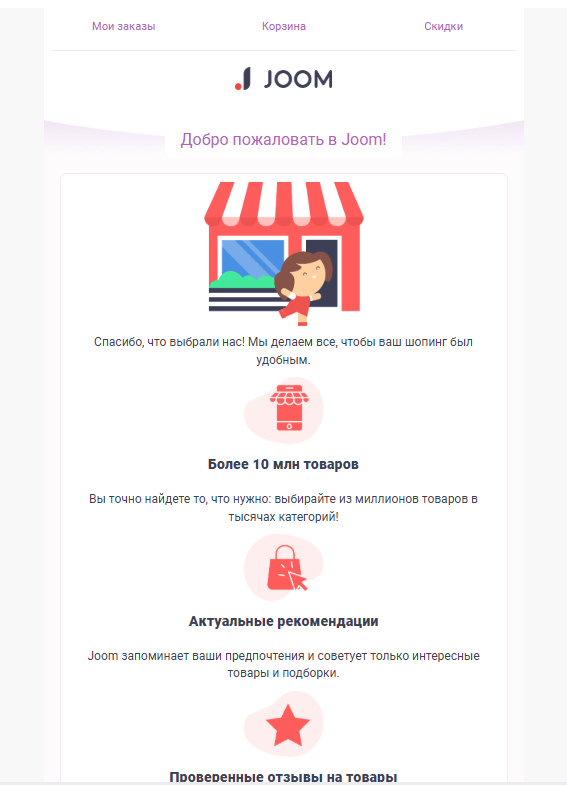
Joom "Welcome"Breakdown: a good example of an introduction that focuses on the service's convenience rather than sales.

Prosto App — a transactional emailBreakdown: a minimalist design and a clear action plan for the user.

2. Requesting feedback and upselling (N days after purchase)
Once the initial excitement of a purchase fades, it's time to strengthen the relationship. This usually happens a week later for products, or two weeks later for more complex services. Ask whether the customer is happy with everything. This is also a good moment to offer complementary products. For example, if a customer bought a coffee machine, offer them coffee beans or filters.
3. Reactivating inactive subscribers
If a user has ignored your emails for more than two months, they're at risk. A three-stage sequence works well here.First, send an emotional email saying you miss them. Then show important product updates. Finally, offer a time-limited bonus. This will either bring the customer back or let you clean stale addresses out of your list in time.
(un)real — reactivationBreakdown: the right mix of emotion and a concrete offer.

mads — a surveyBreakdown: ready-made answer buttons right inside the email let you collect reasons for churn without extra clicks to the site.

4. Personal triggers: birthdays and anniversaries
A birthday greeting or an anniversary of the first purchase is the simplest way to show attention. For it to work, the gift needs to be valuable and shouldn't require jumping through hoops.Too high a minimum order amount to activate the bonus can cause frustration instead of delight.
Mail.ru "We brought you a cake"Breakdown: a friendly communication style without unnecessary elements.

Screenshot: Ozon — birthdayBreakdown: an example of integrating gifts from partners, which expands the range of choices.

5. A reminder for a repeat purchase
This scenario is essential for products people buy regularly. Calculate the average time your product lasts. If a bag of pet food runs out in a month, send a reminder on day 25.Frame the email as thoughtfulness, not a demand to buy. A one-click, pre-filled cart makes life much easier for the user.
6. An email after canceling a subscription (win-back)
A customer leaving is a chance to get honest feedback. Genuinely express regret about parting ways and ask a single question about why. Sometimes it's enough to offer to change email frequency or temporarily pause the account to keep the person with you.
Common mistakes and a rollout order
The most common mistake is missing stop conditions. If a person makes a purchase after the first notification, they shouldn't get the rest of the emails in the win-back sequence. Also watch the frequency: if automated messages overlap with regular campaigns, users may get too much email, leading to spam complaints.
Roll this out gradually. Start by setting up scenarios for new customers and for an audience that's leaving, since they deliver fast results.
Priority | Scenario | Why it matters |
|---|---|---|
1 | After the first purchase | Reinforces success and loyalty |
2 | Reconnecting | Protects the list and recovers revenue |
3 | Personal occasions | Boosts open rate and engagement |
4 | Repeat sales | Increases customer lifetime |
Performance metrics
The retention system's results are assessed using four indicators:
Customer lifetime value (LTV). This is the total profit a single customer generates over their entire relationship with you. With successful retention, this figure steadily grows.
Retention rate. This shows the percentage of customers who come back for a second purchase and beyond. The higher this percentage, the more loyal your customer base.
Churn rate. This metric reflects the number of users who stopped buying or unsubscribed. Effective triggers help slow down this loss.
Revenue per email (RPE). This metric shows the financial return from each send. For trigger emails, it's usually several times higher than for mass campaigns.
How Letteros simplifies working with triggers
For a retention sequence to deliver results, it's important to maintain a consistent visual style. Letteros has dedicated tools for exactly that.
A template builder. You build emails yourself. They automatically adapt to mobile screens without needing a coder.
A master template. You set the overall style once, including fonts, colors, and button shape. All subsequent emails in the sequence, from order confirmation to a birthday greeting, inherit this design. This approach saves time and makes your communications recognizable.
Rendering checks. Testing tools show how the email looks across different email clients, including Outlook. This guarantees the layout won't break and the customer will see the message exactly the way you intended.
A systematic approach to triggers turns email into a stable revenue channel. Start using professional tools today.