
Marketers have avoided the words "free", "discount", and "urgent" in emails for years. Some of that fear is justified, some of it is long outdated. Let's break down how spam filters actually work and what they depend on in 2026.
What trigger words are and where they came from
Trigger words are words and phrases historically associated with spam: "free", "earn money", "only today", "click here", "guaranteed income".
In the early 2000s, spam filters worked on a blacklist principle. One forbidden word in the subject line and the email went straight to spam. Back then, the "avoid trigger words" rule actually worked.
Since then, filters have changed dramatically. Modern algorithms from Gmail, Yandex, and Mail.ru don't react to individual words — they evaluate the email as a whole.
How spam filters work in 2026
A modern filter analyzes several factors at once.
Sender reputation. This is the main criterion. Gmail looks at the domain's and IP's history: how many emails get opened, how often people complain about spam, how long the domain has been active. A new domain with no history raises suspicion on its own, even if the subject line doesn't contain a single forbidden word.
Recipient behavior. If subscribers open emails, click, and don't complain, the algorithm considers the sender trustworthy. If emails get ignored for months, reputation drops, and even good emails start landing in spam.
Technical settings. SPF, DKIM, and DMARC — without them, emails automatically raise suspicion with every major mail service. This isn't a recommendation, it's a baseline requirement.
Email content. Spam filters analyze the text, but they don't search for individual words. They look at the concentration of aggressive phrases, the ratio of text to images, the number of links and their quality.

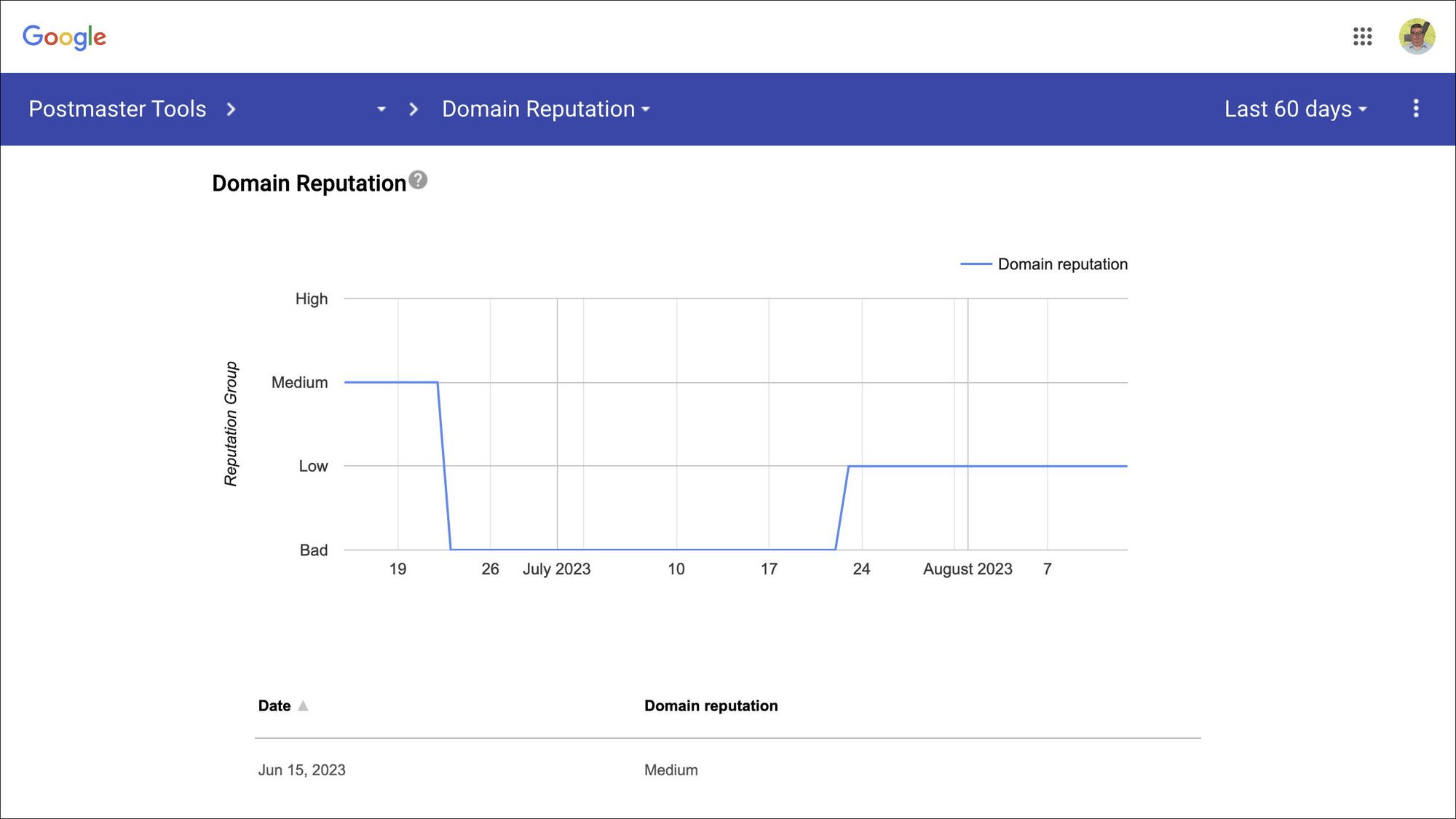
A Domain Reputation graph from Google Postmaster Tools — the domain's reputation dropped to Bad after campaign issues and gradually recovered. This metric is what determines where emails land: the inbox or spam.
Myths about trigger words
Myth 1. The word "free" sends an email to spam
No. The word "free" appears in emails from Amazon, Yandex, and Tinkoff, and they still reach the inbox. The problem isn't the word, it's the context. "Free" in an email from a domain with a good reputation and an engaged list isn't a threat. The same word in an email from a new domain, without SPF/DKIM, sent to a purchased list — that's nearly guaranteed to be spam.
Myth 2. Capital letters in the subject line block delivery
Partly true, but not absolutely. CAPS LOCK in a subject line looks aggressive and lowers open rates. But one capitalized emphasis won't kill an email. The problem starts when the entire subject line is written in caps.
Myth 3. Exclamation marks get caught by filters
One exclamation mark — no. Five in a row — that's already a signal. Filters react to patterns, not individual characters.
Myth 4. Words like "sale", "discount", "clearance" can't be used
They can. Every major retailer uses these words daily — Ozon, Lamoda, Wildberries. Their emails get through because they have a strong domain reputation and an engaged audience. The problem isn't the words, it's what surrounds them.
Myth 5. A neural network will generate text without trigger words and the email will pass the filters
No. In 2026, mail providers use their own AI detectors that recognize templated text written by a neural network without editing. Such emails get a lower delivery priority.
What actually affects landing in spam
If emails are landing in spam, the reason is almost always one of four things.
A cold or purchased list. People who never agreed to receive emails file spam complaints. Even a few complaints per 1,000 emails noticeably hurt a domain's reputation.
Sending to an inactive list. If half the list hasn't opened an email in six months, that's a signal to the algorithm that the emails aren't wanted. Regular list cleaning matters more than any rule about words.
A sharp jump in send volume. A domain with a history of sending 500 emails a day can't suddenly send 50,000 without consequences. Warming up a domain is a mandatory step before scaling.
A poor text-to-image ratio. An email that's 90% one banner and one link looks suspicious to a filter. At least 60% text content lowers the risk.

An example of an email with the right text-to-image ratio — the text explains the point, the images illustrate it, one button at the end.
Words genuinely worth avoiding
Not because they automatically trigger filters, but because they lower the reader's trust.
"Guaranteed income", "earn money without leaving home", "only for you and only now", "don't miss this chance", "click immediately" — these phrases work against the email not because algorithms dislike them, but because people do. The reader spots the manipulation and closes the email. Filters react to behavior, and behavior is determined by people.
The practical takeaway
Instead of a list of forbidden words, focus on three things.
Domain reputation. Set up SPF, DKIM, DMARC. Monitor your metrics in Postmaster Tools. Don't send to cold lists.
List quality. Regularly remove inactive subscribers. An email opened by 30% of the list gets delivered better than the same email sent to a list with a 5% open rate.
Content. Write for people, not for algorithms. A useful email from a sender with a good reputation will get through, even if it contains the word "free".
Read also: