
Seasonal campaigns fail for one reason: teams start preparing them a week before the event. The emails come together in a rush, the design is thrown together from whatever's on hand, and the copy gets written overnight.
Companies that prepare ahead of time get a different result — thoughtful sequences, a solid design, and time to test before sending.
Why early preparation changes the outcome
A week before New Year's or Black Friday, inboxes are packed. Everyone's sending similar emails with similar discounts and similar subject lines. The winners are the ones who started earlier and managed to do something different.
There's also a purely practical side: designing a good email takes time. A holiday master template, new modules, testing across clients — that's not something you can do in a day.
A prep calendar
Event | Start of prep | First email | Final email |
|---|---|---|---|
Black Friday (late November) | Early October | 2 weeks before | The evening of the sale |
New Year's | Early November | December 1–5 | The afternoon of December 31 |
International Women's Day | Mid-January | March 1–3 | The evening of March 7 |
Valentine's Day | Late December | February 10–11 | February 13 |
Company birthday | 6 weeks before | 2 weeks before | The day of the event |
SAYSO splits gifts into "for her" and "for him" and sets a deadline right in the email — "Order now to get it on time"
Black Friday
Black Friday isn't one day, it's a month. Major players launch early access two weeks out, stretch the sale across the whole week, and wrap it up with a final email on Sunday.

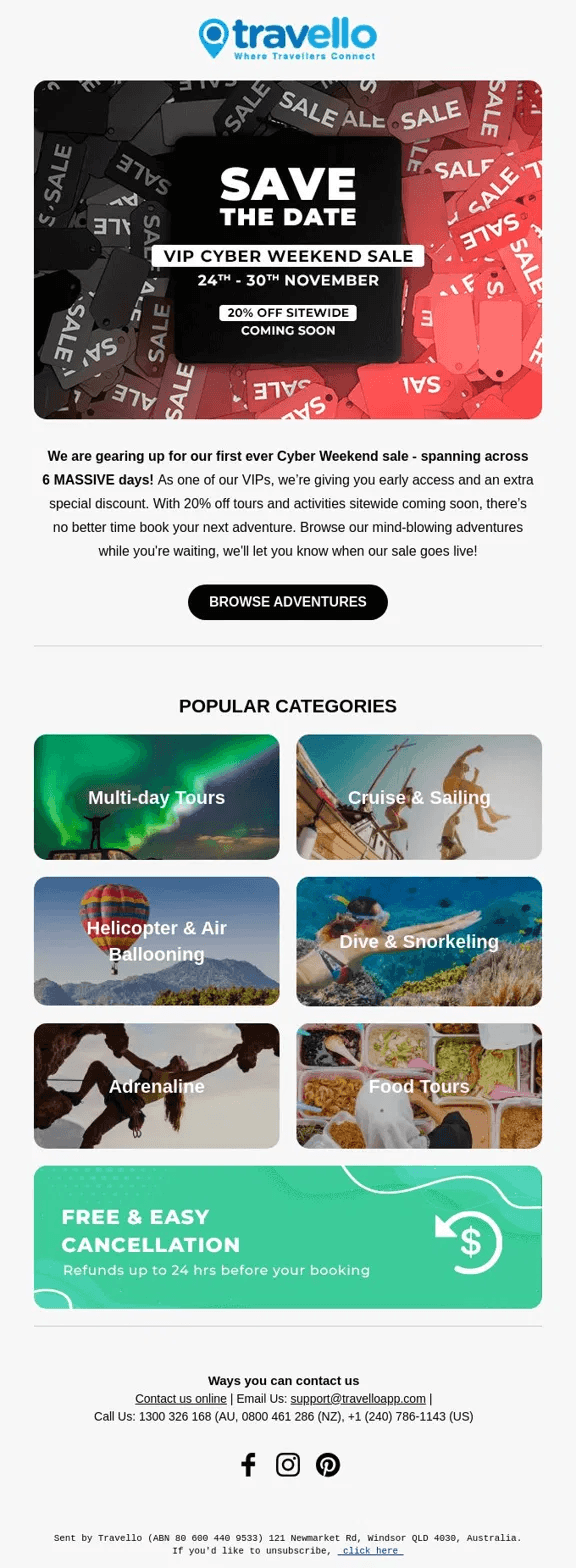
Travello announces Cyber Weekend a few days before it starts — specific dates, the discount, and product categories
Campaign structure
- 2 weeks before. An email for subscribers with early access or an increased discount. "Just for you — 35% off starting November 20, before the official launch." This rewards loyal customers and creates a sense of exclusivity
- A week before. A teaser with no details — "Something big is coming next week." Don't reveal the discount yet
- Friday morning. The campaign's main email. The offer above the fold, specific categories or products, a clear deadline
- Saturday–Sunday. Emails for people who haven't bought yet. A roundup of top items or a reminder that the sale is ending
- Sunday evening. The finale. A countdown, a specific end time, one button

ROKA shows specific models with the old and new price — no abstraction, it's immediately clear what and for how much
New Year's: two different campaigns
The New Year's season is actually two different periods with different logic.
December is gift season.
People are buying for others, not themselves. Emails should answer the question "what should I get." Roundups by budget, recipient category, or age — anything that makes gift-picking easier works better than generic discounts.
December 31 is the year's finale.
This calls for different mechanics: "last chance to close out the year with a deal" or "start the new year off right." This email is about a personal decision, not a gift for someone else.

Goody segments gifts by recipient, not price — each block answers a specific "who's this for" question
What doesn't work in New Year's emails
- Generic greetings with no offer. "Happy New Year! Wishing you happiness" is a greeting card, not an email
- Snowflakes and Christmas trees for their own sake. Festive design should support the offer, not distract from it
International Women's Day
March 8 is a holiday with a clear audience split. Some people are buying gifts for women, others are buying for themselves. These call for different emails with different offers.
- An email for people buying a gift. A roundup with ready-made ideas, gift wrapping as an option, fast delivery in time for the date — anything that removes the stress of choosing
- An email for women — for themselves. A specific offer, a specific benefit. No condescending tone
Timing is critical for International Women's Day. The first email goes out March 1–2. The final one, the evening of March 7. An email on the morning of March 8 is already too late: the gift is needed today, not tomorrow.

Moment partners with affiliate brands for a $5,000 giveaway — an email about values, not a discount
How to prepare templates in advance
The biggest mistake in preparing seasonal emails is building a new design from scratch every time. It takes a long time, and there's a risk of breaking something each time.
The right approach: build a holiday version of your master template once, and reuse it every year with minimal tweaks. Change the color scheme, add seasonal modules — a banner, a countdown, a roundup — and you're done.
In Letteros, the master template locks in the base style, and holiday modules get added on top of it. You don't need to code a New Year's email from scratch every December.
More on master templates: letteros.com/blog/markup/kak-uskorit-sozdanie-email-rassylok-s-pomoshhyu-master-shablonov-i-sistemy-gotovyh-modulej
More on checking an email before sending: letteros.com/blog/sovety/kak-proverit-pismo-na-oshibki-pered-otpravkoj