
A quality welcome email for your campaign is a great opportunity to get more clicks and draw attention to the company's further email communication. According to Invesp data, people open a welcome email 4 times more often than mass email campaigns. The average open rate of welcome emails is 50%, making them 86% more effective than any other email.
In this article, we'll explain what a welcome email is, what goals and tasks it serves, and how to make it as useful as possible for both the customer and the business. Plus, inside the text you'll find 5 ideas for writing a top-notch welcome message.
What a welcome email is
A welcome email (welcome-email) is the first or second email a new user receives after registering on a website or subscribing to a newsletter. It will be the second one if the company has Double Opt-in enabled (double subscription confirmation). Either way, communication with the customer begins with the welcome email.
Through a welcome email, companies introduce their brand, encourage the use of their products and services, and answer questions that may have come up during the first interaction.
Interesting fact
According to statistics, companies' welcome emails bring in on average 320% more revenue per email than other promotional campaigns.
The goal and objectives of a welcome email
The main goal of such a message is to establish an initial interaction with the user in email communication and create the first point of contact between the organization and its potential customer.
Despite the high performance of welcome emails, 57.7% of brands skip sending one and miss the chance to increase customer loyalty. According to a study, 74% of subscribers expect a welcome email as a response to signing up.
Key goals of the email:
- confirm that registration was successful;
- introduce the new subscriber to the content that awaits them;
- move the user further down the funnel.
What can be included
We've put together a few options for what to include in a welcome email. The first two points are the basics. The rest you can pick and choose from.
- The headline is the first thing the subscriber sees in the subject line. It should be a clear phrase of a few words that reflects the content of the text.
- Be sure to include a friendly greeting and a thank-you for subscribing.
- If needed, you can add a concise set of instructions on how to use the website, the app, or how to claim a personal gift.
- Another option is to write a short summary of what the company's newsletter will be about: announcements of new products or events, discounts, promo codes, and other perks.
- Always try to include useful links to social media, the app, blogs on various platforms, articles, and other sources that a new user might want to check out.
You can also include the company's contact details for feedback at the end of the welcome email. And don't forget the "unsubscribe" button, so the subscriber always has a choice.
Tip
Write simply, briefly, and clearly. Include only information that could actually be useful to the reader.
A welcome chain instead of a single email
If a company wants to tell its story right away — its brand, how it was founded, its products and services — a welcome chain can almost always be used. This is a series of welcome emails automatically sent to a newcomer at set intervals.
Here are three possible scenarios:
- Brand introduction. In three or four emails, the company concisely tells its brand story, reveals its mission and values, and introduces its products. The goal of such emails is to immerse the customer in the brand's world and make them part of the community.
- Onboarding. Emails of this type contain instructions, examples, and recommendations for using the product. They let you introduce a new user to the platform right from the first contact, show its capabilities, and answer frequently asked questions.
- Best content. A company can make a strong first impression on a new subscriber by including its best content in the campaign. This is a good place to use a high-converting article or a case study that got a record number of comments. You can hook a new user with top-tier content that lives up to their expectations, and reuse successful materials again and again.
Whatever scenario is chosen, it's important to maintain a logical narrative flow across the welcome emails.
Recommendation
To avoid overwhelming a newcomer and keep the campaign as unobtrusive as possible, before working out the scenario you need to analyze the possible entry points (where a person might subscribe from) and decide on the number of emails and how often they'll be sent.
Welcome email examples and ideas
Let's look at specific examples of what can be included in a welcome email for new subscribers.
Letteros
What it is
A modular editor for creating emails from unique templates, suited for both beginners and experienced coders.
What they use in the welcome email
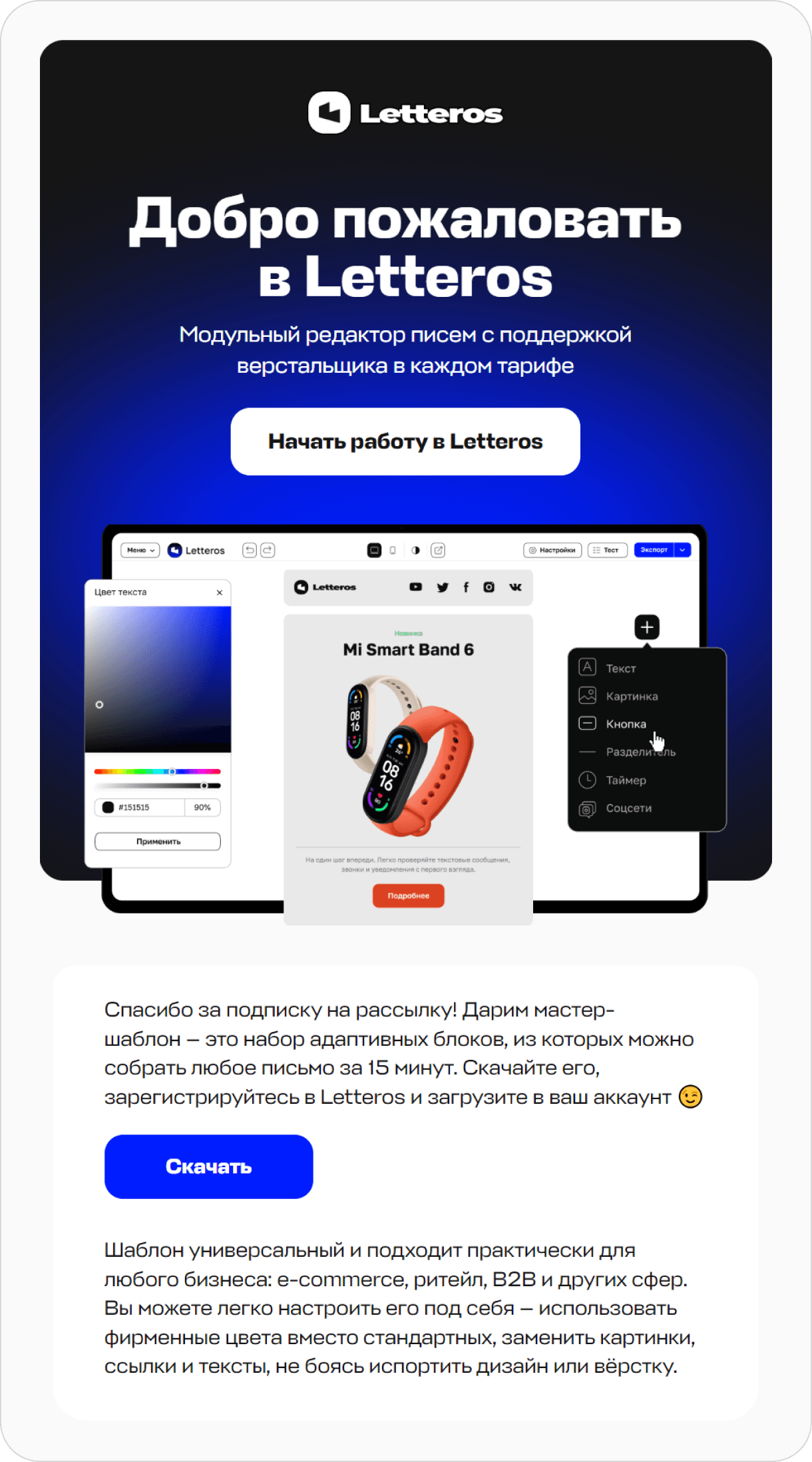
The new user receives a lead magnet in the form of a master template.

A welcome email variant with a lead magnet
A lead magnet can be not only a template, but any useful product: a webinar recording, a free book, or a branded habit tracker.
Sportmaster
What it is
A chain of stores selling sporting goods and gear for active leisure.
What they use in the welcome email
New subscribers get a personal bonus — a discount promo code. This way the brand not only says "thank you" for subscribing, but also encourages the user to make their first purchase.

Sample email from Sportmaster
The promo code often has a limited validity period, so the user uses it as soon as possible and buys products at a good discount.
VOISHE
What it is
A Russian-made brand of comfortable, feminine clothing.
What they use in the welcome email
The email includes information about what's next for the user. Potential buyers also get the chance to enter a giveaway for a linen suit.

A simpler, but no less informative, welcome email example
A great solution for a welcome message. In the very first notification, users learn about the company's tradition of giving gifts, which boosts audience engagement.
12storeez
What it is
A Russian brand of women's and men's clothing with stores in Russia, Kazakhstan, and Dubai.
What they use in the welcome email
This uses an interesting and unusual approach that grabs the user's attention. The brand created phone wallpapers with an aesthetic it shares, and gives them to all subscribers.

12storeez didn't just attach photo files to the email — they made it interactive
12storeez also didn't forget to include brief instructions on how to download the wallpaper to your device.
Zolotoe Yabloko
What it is
An online store for professional cosmetics and perfume.
What they use in the welcome email
Zolotoe Yabloko doesn't give out promo codes, lead magnets, or the like, but instead tells you about what the store has to offer. From the email, it's immediately clear that the store has a wide selection, delivery across Russia, a loyalty program, and a mobile app.

A great example of concise, stylish design from Zolotoe Yabloko
RBC Pro
What it is
A unified information hub for professional development and learning. A service for making decisions in career, business, and finance.
What they use in the welcome email
RBC Pro gets straight to the point and gives a brief overview of its service. At the end of the message — a feedback form and a link to the newsletter settings block in the personal account.

Restrained and informative, with no unnecessary flourishes, from RBC Pro
What's the takeaway
Well-thought-out welcome emails can warm up new leads and increase sales and customer loyalty.
A welcome campaign doesn't have to consist of just one email. If a company wants to share more about itself, or has more to offer a new subscriber, it can launch a whole chain. The main thing is for the welcome chain to be well-thought-out and logical. Otherwise, there's a chance the user will quickly unsubscribe due to a flood of disjointed messages.
To create a quality campaign, you don't need to design and build everything from scratch. The Letteros modular editor helps you quickly and conveniently create an email template, fill it with content, check its quality, and make sure everything works perfectly on any device. Once a welcome email or any other email has passed the check, you can export it to PDF in one click, or send it straight to your email platform.
Try the demo editor Letteros. Create quality email campaigns and don't neglect the welcome email.