

Design is what holds all email marketing together. Even if your email has great copy, no one will read it without a thoughtful, stylish visual. In this article, we explain how design affects email marketing performance and which design decisions are always worth using.
Why email design can matter more than the copy
How well an email is put together determines whether subscribers read it all the way through or not, and whether they take the target action or just close the email. Visuals help readers quickly grasp the message, focus on the most important information, and feel something from the newsletter they received. A fully text-based email can also be an interesting choice, but even then you need to take care of the design from a typography standpoint. Otherwise, the email won't work and won't drive sales.
Beyond looking good, design also affects an email's technical performance. If it's put together incorrectly, the email can automatically end up in spam, which risks a blacklist and the sender's address getting blocked.
Best design practices that will improve your newsletter
Email design trends are constantly changing. New trends and creative ideas keep appearing, but we've picked out the ones that can be considered timeless.
Modular design system
When you're putting out hundreds of emails a month, building each one from scratch makes no sense. It's much simpler and more efficient to use a ready-made modular system. It consists of a set of different email elements: several button variants, banners, product blocks, and text blocks. A system like this lets you assemble newsletters like building blocks, saving time and without needing a coder.
Letteros is a convenient modular email editor that helps streamline newsletter creation.
You can add any elements you use most often for email design to your modular system — branded stickers, fonts, a corporate color palette, and anything else you need to create great emails.
Responsive newsletter design
Your email design needs to adapt to the devices people use to open it. To do this, you need to build a responsive design using CSS attributes that detect the device's screen size and automatically adjust the email's design accordingly. You can build responsive visuals for each email either through the @media attribute or using a responsive template.
Without responsive design, no matter how cool the email looks, its conversion rate won't be impressive — because it won't display correctly on every device. Keep this in mind if you want to see great results from your marketing campaigns.
Dynamic content for personalization at scale
Personalized newsletters are the biggest email trend for the next few years. If you want to improve your email results, you can use personalized text and visual elements that automatically update depending on the recipient. This automated approach saves you from spending time creating hundreds of versions of the same email.
A visible unsubscribe button
Many brands, even the biggest ones, sometimes try to hide the unsubscribe button as much as possible, hoping this will save them from losing readers. In fact, this trick can cause even more problems. If a subscriber can't find the unsubscribe button, they'll mark the email as spam — not because they're being difficult, but simply because they want to tidy up their inbox. Once the complaint rate crosses the 0.8–1% threshold, the mail client will block the sender's domain, and it will be hard to rebuild your reputation after that.
We recommend never forgetting the unsubscribe button and making it as obvious as possible, so readers can unsubscribe quickly if they want to. That doesn't mean the button needs to be front and center in the email, but there should always be one in the footer.
Important
Having a quick-unsubscribe button in every email is required under Russia's Advertising Law.
ALT text for images
An email's content should be accessible to the entire audience, and one way to ensure that is by adding ALT text to images. Alt text should be short, informative, and describe the image's content in words. It's essential for making sure the newsletter's message comes across to everyone, including users who have images disabled or reading mode turned on.
Optimizing images for dark mode
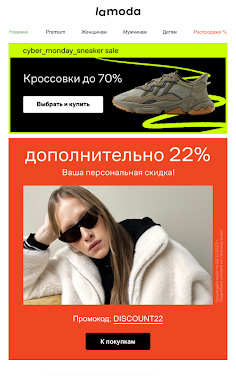
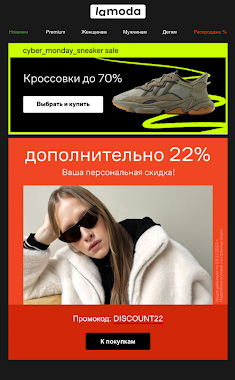
Studies show that more than a third of newsletter readers view emails in dark mode. So to show your readers you care and boost their loyalty, it's worth optimizing every newsletter for dark, or "night," display mode.
Here's an example of an email from Lamoda with background image optimization implemented:
Web-safe fonts
Typography is also part of design, and it matters for the visuals just as much as images do. The problem is that, like images, fonts might not display on a user's device due to email client limitations. For example, a reader likely won't see the creative custom font you added to the email, because the client will automatically swap it for a web-safe font — Arial, Times New Roman, and other classics. There's also a chance the subscriber won't see the text at all, since the client simply won't render anything set in a web font. So it's better to use web-safe fonts for the body text of a newsletter right away, and save any creative typefaces for banners and images. That way you can be sure the email will display correctly for recipients.
Stylish visual effects
Emails with images are already table stakes. That's why it's great when newsletters feature GIFs, interactive elements, and even video. These elements make emails more dynamic and lively — the kind you want to read to the end. Just don't overdo it with the number of effects, or the email can turn into a mess where nothing makes sense.
Here's an example from Dodo Pizza showing how a single great GIF can improve an email:

No visual clutter
Don't forget that emails need enough white space. This lets readers quickly scan the email and grasp the gist of the message. If the visuals are overloaded with lots of elements, however fun, it becomes hard for the user to pick out the main content — which means they're unlikely to read the whole thing, reach the call to action, and click the button.
In lieu of a conclusion
The success of email marketing is literally tied to design, so it deserves maximum attention — though not necessarily maximum time. With Letteros you can put together the trendiest on-brand emails without spending your whole workday on it. To see what the editor can do, try a free demo.