
Most of the time, a corporate digest gets put together by hand: copy the old email, edit the text, the layout shifts, edit again, get it approved, edit again. Three hours later, the email is sent. Next week, the same story repeats.
If this sounds familiar, you definitely need modular layout. Let's break down how it works in practice.
Why manual layout is a systemic problem
Corporate HR newsletters are one of the most frequent, and at the same time most underrated, email formats. Weekly digests, monthly reports, congratulations, job openings, quarterly wrap-ups — all of it goes out constantly, and every single time it eats up time the HR team doesn't have.
The main problem with manual layout isn't that it's slow. The problem is unpredictability:
- The logo shifted out of place and nobody noticed before sending.
- A new HR manager put together the digest "their own way," and the brand style got broken.
- A manager asked for a block to be added at the last minute, and the whole layout fell apart.
- The email looks completely different on mobile than it does on desktop.
All of this is the result of not having a system, and modular layout solves it.
What modular layout is, in plain terms
Picture a set of Lego bricks. Ready-made pieces of different sizes and purposes — you can build anything out of them without risking the whole thing falling apart.
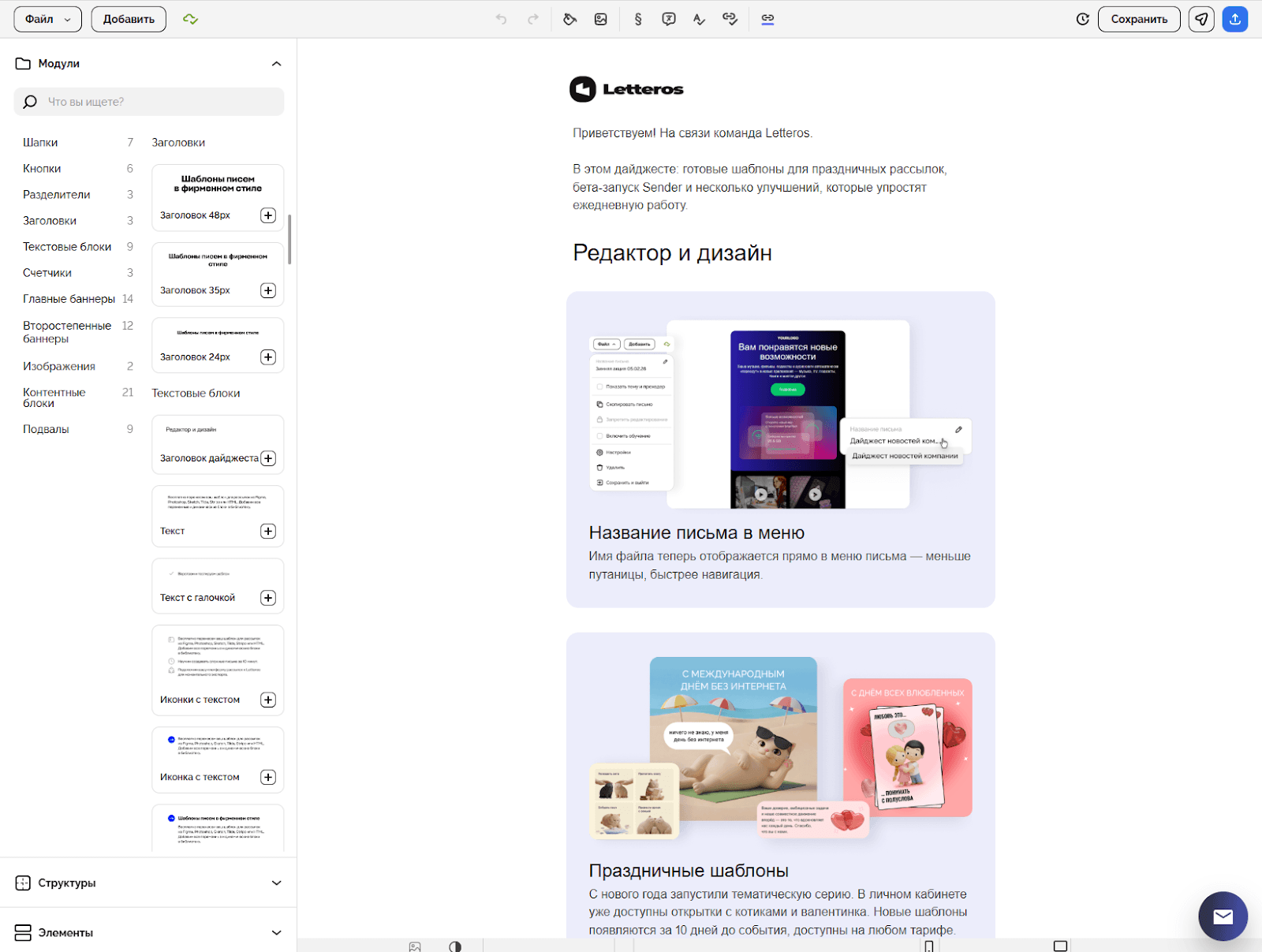
Modular layout works the same way. An email isn't built as one monolithic HTML file that you can't touch without risking breaking everything — instead, it's assembled from independent block modules:
- Header with logo and newsletter name
- Intro text
- "This week's highlights" block
- Event or announcement card
- Job opening block
- Congratulations
- Quote from a manager
- Footer with contacts and unsubscribe link
Every module is tested, branded, and ready to use. The HR manager picks the blocks they need, swaps in the text and images — and the email is done. No developer needed, no risk of breaking the design.
Monolithic email vs. modular email:
Monolithic | Modular | |
|---|---|---|
Preparing a new issue | Copy the old one, redo everything | Pick blocks, swap out content |
Time to assemble | 2–4 hours | 20–40 minutes |
Brand style | Depends on how careful the person is | Built into every module |
Layout errors | Frequent, especially with edits | Minimal, blocks are already tested |
Onboarding a new employee | "Ask HR, they know" | Anyone can follow the instructions |
A non-standard email | Possible | Possible, using a "free-form" block |

Who needs this
Modular layout is relevant for anyone sending regular emails with a repeating structure. Above all:
Mid-size and large businesses with an HR team — where the digest goes out every week and the person responsible for the layout is an HR manager or editor, not a developer.
Companies with distributed teams — when an email goes out to different offices and divisions, and it matters that everyone gets an equally professional message.
Businesses with high HR turnover — so that one person leaving doesn't derail the corporate newsletter.
Organizations with strict brand requirements — banks, retail chains, state corporations, where every internal message has to meet certain standards.
Typical HR newsletters that benefit from a modular system
1. The weekly corporate digest
Without a system, the structure changes from issue to issue, depending on who put it together. A modular approach locks in a set of blocks once and for all — only the content inside changes.
Benefit of modular layout: preparation time drops by 3–5x, and the email looks the same regardless of who put it together.
2. The monthly report for leadership
With manual layout, every data update breaks the look. A modular template with a fixed structure (KPIs, events, table, conclusions) lets you simply drop in the new numbers.
Benefit of modular layout: the report looks like a proper document instead of an Excel spreadsheet. That affects how the business perceives the HR function.
3. Event and training announcements
Every hand-built announcement means a new design, a misplaced button, poor readability on mobile. A ready-made block already includes a cover image, date, description, and registration button.
Benefit of modular layout: announcements go out faster, in a consistent style and format.
4. Welcome email for new employees
The onboarding email is usually kept by one person and rarely updated. A modular template with welcome, first-steps, and contact blocks gets updated once and always stays current.
Benefit of modular layout: every new employee gets an equally professional first impression, instead of whatever someone managed to dig up and send.
5. Surveys and feedback collection
Without a template, a survey email gets built from scratch each time or arrives as plain text. A ready-made module with a question and visual answer buttons can be added to any email in a minute.
Benefit of modular layout: surveys feel like part of a consistent communication style, and response rates go up.
Which metrics actually change
Open rate. Recipients recognize emails by their style and start to trust them. A regular, predictable newsletter feels like a habit rather than spam.
CTR. CTA blocks sit in the right places, following a system that's been tested once, rather than by accident.
Number of errors. Layout breaks far less often when an email is built from ready-made blocks instead of raw HTML.
Preparation time. Drops by 3–5x — that's hours the team spends on something useful instead of on layout.
Onboarding. A new employee gets up to speed in a few hours because they're working with a system instead of asking colleagues "how does this all work."
How Letteros helps
Master template
The master template in Letteros is the core document of the system: brand colors, fonts, spacing, grid, logo. All other templates and modules are built on top of it.
No matter who puts the email together — a marketer or an intern — the brand style stays consistent, because it's built into the template rather than living in one person's head.
Ready-made newsletter templates
Letteros has a library of ready-made templates. Each one is adapted for Gmail, Mail.ru, Yandex Mail, and Outlook.
It's a convenient starting point if you need to launch a newsletter quickly, without designing a system from scratch.

Template development for your brand
If ready-made templates don't fit — a complex brand book, non-standard requirements, or simply no time to figure it out — the Letteros team will build everything for you, end to end:
- Analysis of your current newsletters and brand requirements
- Development of a master template with your brand style
- Building a module library for your email formats
- Testing across all key email clients
- Handover of templates with usage instructions
The HR team gets a ready-made system where all that's left to do is drop in the content. A developer is no longer needed for day-to-day work.
How to build a modular system: a step-by-step plan
Step 1. Audit Gather all your regular HR newsletters. Write down the blocks that repeat from email to email: header, news block, announcement, table, button, footer. These will become the basis of your library. Record how much time each format currently takes to prepare — this is your baseline.
Step 2. Design the system Put together a list of the block types you need. For a typical HR newsletter, that's usually 8–12. Lock in your visual rules: colors, fonts, spacing, image sizes. If you don't have a brand book, put together at least a basic visual style guide for email.
Step 3. Build the library This is where you need an email developer or designer, but only once. Each module is built separately, tested in the key clients (Gmail, Mail.ru, Yandex Mail, Outlook), and uploaded to the library. In Letteros, a module library is a native feature: blocks are created once and reused without any additional coding.
Step 4. Document it Write a short guide: which module is for what, what goes where, what shouldn't be changed. It'll take a couple of hours, but it'll head off most future questions.
Step 5. Run a pilot Put together one digest issue using the new modules. Evaluate how fast it went, what felt awkward, and what needs refining. After two or three issues, the system will settle into place.
Step 6. Scale it up Move all your regular newsletters onto the modular system. Review the library once a quarter — add new blocks, update the visuals whenever you rebrand.
Technical things worth keeping in mind
Email clients. Most corporate users in Russia read email in Gmail, Mail.ru, Yandex Mail, or Outlook. Outlook is the most demanding when it comes to layout. Every block absolutely needs to be checked there.
Mobile. According to industry research, 40–60% of corporate emails are opened on a smartphone. Modules need to be responsive — adapting correctly to any screen.
Team. You need an email developer or designer just once — to build the library. After that, the HR manager works independently. That's the whole point of the system.
Access. The module library needs to be accessible to the entire team working on newsletters. In a corporate context, a role model matters: who can edit modules and who can only use them.
Common mistakes when making the switch
"Let's make one universal template for everything." One template isn't a system. Without flexibility to combine blocks, it just becomes the same problem in a new wrapper.
"Let's redo everything at once." Start with one newsletter, like the weekly digest. Work out the system, then scale it.
"The system is too rigid." A good library always includes a "free-form" block — for holiday emails and one-off cases. That's not an exception, it's part of the system.
"Build it and forget it." Modules go stale. Rebranding, new formats, a shift in communication strategy — all of this requires updating the library. Review it once a quarter.
The bottom line
A system built properly once lets any team member put together a professional digest in 20–40 minutes — no developer needed, no risk of breaking the newsletter.
Want to implement a modular system?
Try it yourself — sign up for Letteros and use the ready-made templates. You can launch your first digest today.
Need a system built for your brand — submit a request for a custom master template and module library. The Letteros team will handle everything end to end.