
With the sudden departure of Stripo and other email newsletter tools, email marketers are now facing a problem — where can they create great emails without worrying about data security?
One option is services built on Russian software.
Letteros is a multifunctional email builder that runs entirely on domestic software and is focused on the Russian market
3 reasons to switch to services built on Russian software
Payment without restrictions
Some foreign tools are still available in Russia, which is great. But paying for a subscription to them is quite a questThere are no such problems with Russian services. They let you pay for plans in rubles using any convenient method: cards, SBP, and so on — no workarounds or complicated schemes.
Data security
Because the servers are located in Russia, users won't be cut off from the tool in the event of any external disruption. Your company won't lose data and can keep creating great newsletters without worry.
Russian-language support
It helps you resolve even the most unusual issue quickly, and you won't have to wrestle with a translator to phrase your support request correctly.
Extended functionality
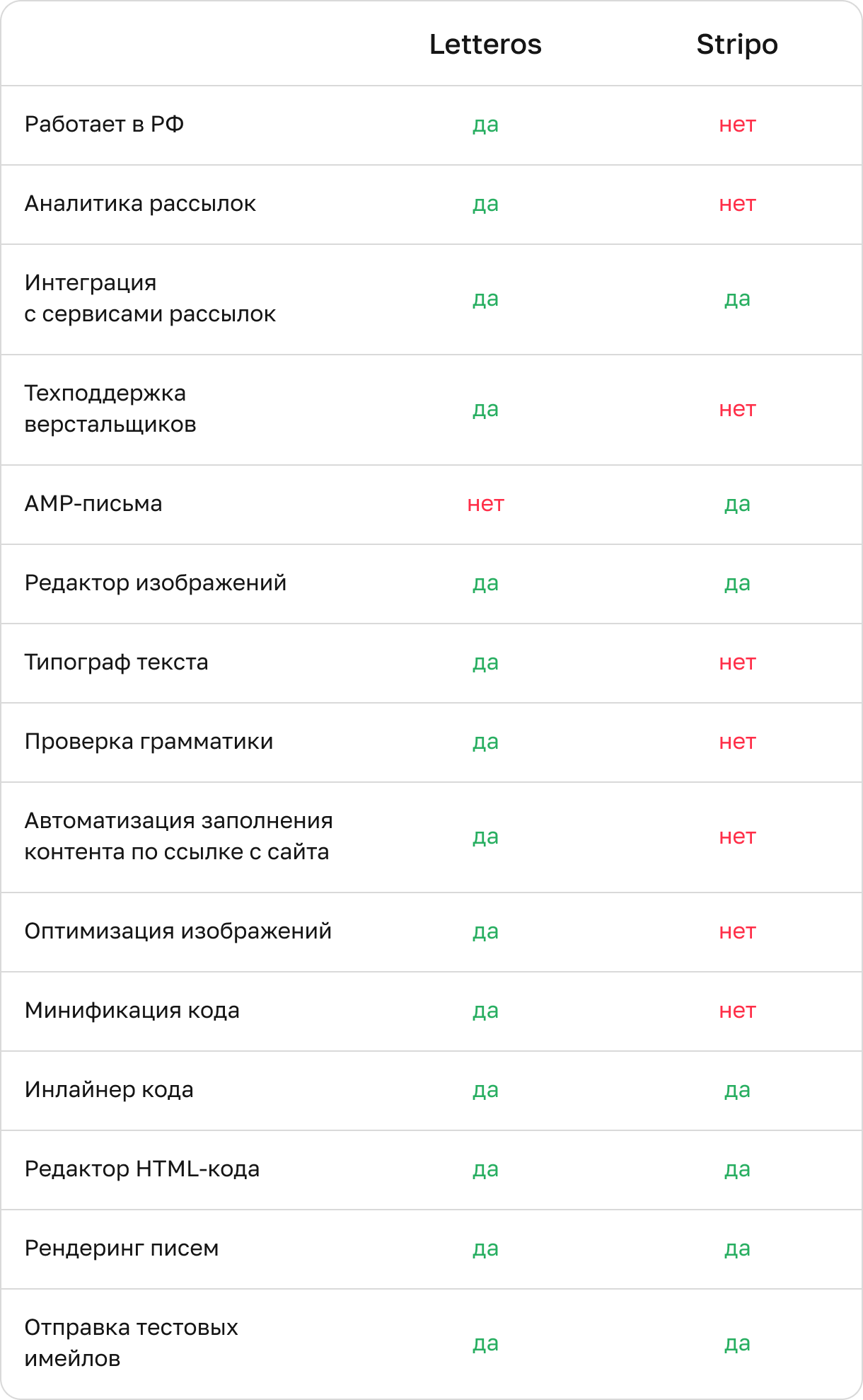
Yes, don't be surprised. Email tools built by Russian developers today can do things that even the most popular foreign competitors can't. Compared to Stripo, domestic services offer more interesting features that make emails even better.
Access to useful materials in Russian
Many domestic services build entire communities where users can talk to each other, share email marketing experience, and get plenty of useful information straight from the creators. All of it is published in Russian and tailored to the Russian audience.
Letteros vs. Stripo email: who comes out ahead
You can compare the services' capabilities yourself and draw your own conclusion.

How to export emails as HTML from Stripo.email into our editor
There are two options: do it yourself, or let our team handle it.
"I'll do it myself"
A 4-step guide:
Add attributes to the markup.
Create a ZIP archive with the newsletter template.
Step 3. Import it into the editor.
Create a newsletter based on the template.
We covered the attributes in more detail with code examples in our dedicated documentation — see the link.
"Do it for me"
Easy.
Leave a request on the website, and our team will quickly help you migrate your template from Stripo under a special plan.
I don't have a template — only a design is ready: how do I start working with Letteros?
Just as easy.Go to the website, fill out the form, and submit your request.We'll create a stylish, high-converting, responsive email based on your design. We'll test it on 100+ email clients, and then teach you how to work with the template and use all the editor's settings and tools.You can check out our case studies and see the beauty of our emails here — projects.