
Email marketing in SaaS exists for one purpose: turning a newcomer into a paying customer and keeping them in the product. The average trial-to-paid conversion rate is 2-5% without deliberate communication work. Build a proper system, and conversion can climb to 10-25%. The difference lies in the chains, timing, and logic of the emails.
Why email works differently in SaaS
In e-commerce, emails sell products. In SaaS, emails solve a different problem: helping the user reach the point where they understand the product's value themselves. This is called the "aha moment" — the moment after which a person doesn't want to leave.
The job of SaaS email communication is to get as many trial users as possible to that moment and keep them from leaving before they get there.
There are a few important differences:
In SaaS, people don't buy on emotion in 5 minutes. In a B2C campaign, it's minutes from the email to the purchase. In SaaS, weeks can pass between signup and payment. During that time, the user either figures out the product or leaves.
User actions drive the logic, not the calendar. In SaaS, behavior-based trigger emails work better than a day-by-day drip campaign. A user who hasn't opened the product on day three and a user who's already set up an integration are two different situations that need two different emails.
Unsubscribing isn't the main threat. In SaaS, a silent departure is scarier than an unsubscribe. The person simply stops opening the product without ever unsubscribing. This needs to be tracked separately.
The structure of the communication: four stages
Stage 1. Onboarding (days 1-7)

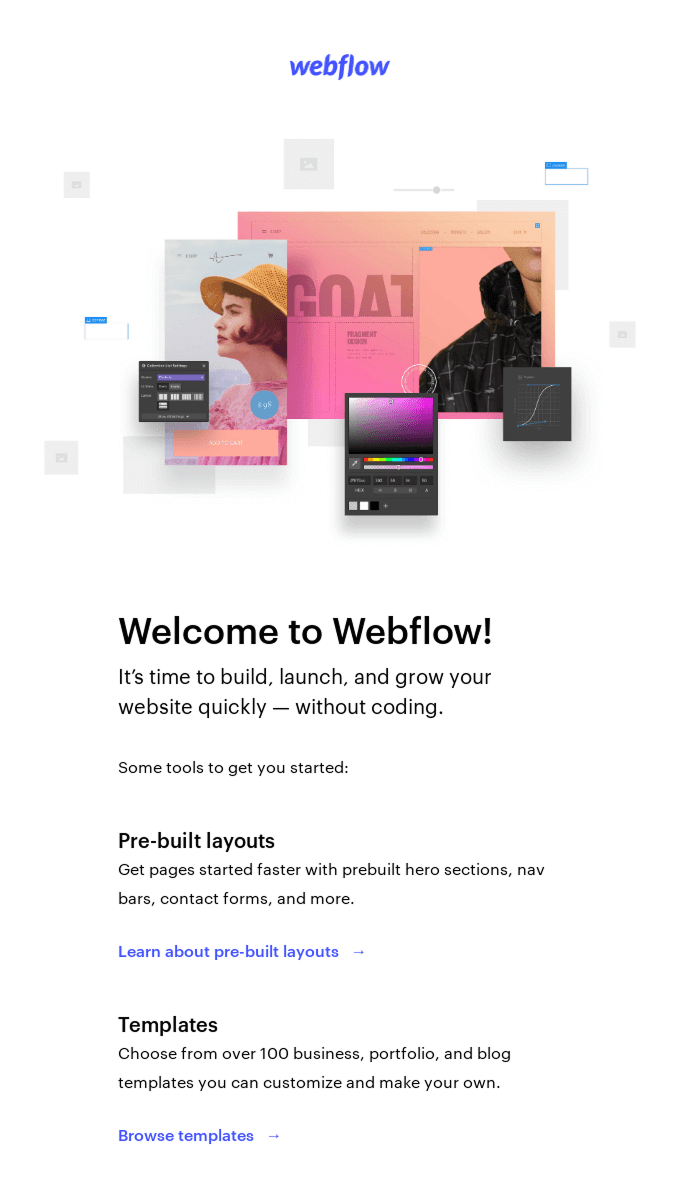
Webflow's welcome email: a product banner, a short greeting, and immediately concrete steps — no company history, no corporate copy.
The first week is the most critical. The user is still motivated, but the product is unfamiliar to them. The job of onboarding emails is to help them take the first steps and reach the "aha moment" as fast as possible.
A complete guide to welcome chains: scenarios, structure, analysis → letteros.com/blog/marketing/welcome-email-guide
How to build email chains for new users → letteros.com/blog/marketing/kak-stroit-czepochki-pisem-dlya-novyh-polzovatelej
The email sent right after registration. Not a corporate welcome with a company history. One specific action: what to do right now.
What to include: registration confirmation, a link to the first step in the product, one support contact — a specific name, not info@.
The day-two email. The key feature used most often. Not an overview of the entire product — one feature, an explanation of its value, a link to try it.

Miro's welcome email: three concrete steps instead of a product description, each with an illustration and a link to act The day-three-to-five email. Another user's case study or a number: "Teams that set up X cut their time on Y by an average of 40%." Social proof removes unnecessary questions and objections.
The day-seven email. A check-in: did the person reach the key action. If not, gently offer help. If yes, the next step.
An example of an onboarding chain structure:
Day | Event / subject line | Goal |
|---|---|---|
0 (immediately) | Welcome — what to do first | First entry into the product |
2 | The main feature worth trying | Activation of the key action |
4 | How [company] achieved [result] with [product] | Social proof |
7 | How's it going? | Checking progress / identifying blockers |
Stage 2. Activation (days 7-14)
By the end of the first week, the user has either set something up or hasn't. Behavior at this stage is the main signal.
If the user is active. Show the next level: an advanced feature, an integration, team mode. Don't push an upgrade yet — the person is still exploring the product.
If the user is silent. Segment them: never logged in at all, or logged in but did nothing. These are different situations.
For those who never logged in, a simple question in an email: "Not sure where to start? Here's the fastest way." A link to a specific step, not the homepage.
For those who logged in but got stuck, ask directly: "What didn't work when setting things up?" Two answer buttons right in the email. It's a cheap way to collect data and show that you're paying attention.
Behavioral triggers at this stage:
- User added data but didn't finish setup → send a reminder and offer help
- User invited a colleague → congratulate them and show team features
- User used the product three days in a row → a signal to start the upgrade conversation
Stage 3. Conversion (days 14-30)

Klaviyo lists the benefits of upgrading — that's better than a plain discount, but it still feels pushy. It's more effective to show the specific result the user has already gotten and what they'd lose.

Perplexity shows Pro's capabilities through specific features and a screenshot of the interface — not "buy the plan", but "here's what you get".
If a user reaches this stage active, they're ready for a conversation about a paid plan. The job is to give them the right argument at the right moment.
Don't lead with a discount. It devalues the product and trains an audience to wait for a discount every time. Start with value: exactly what the user gets by upgrading. Be specific: "You've already created X. On the paid plan you can create unlimited and connect Y."
Remind them the trial is ending. Three days before the end and one day before. Don't scare them with data loss — honestly explain the limitations. Clear terms reduce anxiety.
The final email on the last day. One offer, one button. If the person replied to previous emails or actively used the product, offer a call. A live conversation converts better than any email at this stage.
The email after the trial ends. All isn't lost. Some users come back within a week. A short email: "Your account is waiting. If something didn't click, we can help" — this isn't a sales pitch, it's an open question.
Where to Start with Email Automation
Stage 4. Retention and growth (after the first payment)

OpenAI's post-payment email: a two-sentence confirmation, one button — no extra text.
The first payment isn't the finish line. A user who paid once might not pay again.
The email after the first payment. Confirmation + one tip on how to get the most out of the features now available. Don't sell — the person just bought, give them room to breathe.
Feature-usage emails. If a user isn't using a key paid-plan feature, show them how it works. This reduces the chance of cancellation: the person wants to get what they're paying for.
The email before the next charge. A few days ahead. A brief reminder of what the person got during the past period. This reduces the surprise of the charge and shows value.
Churn signals. If activity in the product suddenly drops, don't wait for the person to cancel. Launch a chain: "We noticed you haven't used X in a while — did something go wrong?"
Strategies for Win-Back and Loyalty via Trigger Emails
A Strategy for Winning Back Inactive Subscribers
How to segment your trial user base
Not all trial users are the same. Minimal segmentation dramatically improves email relevance:
Segment | Trait | What's needed |
|---|---|---|
Active | Logs in regularly, sets up features | Next step, advanced capabilities |
Passive observers | Signed up, occasionally logs in, hasn't set anything up | Help with the first step |
Never returned | One visit, never logged in again | A simple question about the blocker |
Close to converting | Active, trial ending soon | A conversation about the plan, no discounts |
Qualified leads | B2B, several users from the same company | Offer a demo call |
How to Segment Your Subscriber List Without a CRM
Metrics that show the chain is working
Trial-to-paid conversion rate. The main number. Calculated as the share of trial users who move to a paid plan. A typical figure without deliberate work is 2-5%; with good communication, it's 10-25%.
Time to activation. The average time it takes a user to complete their first key action. If it happens faster, onboarding is working.
Email engagement by segment. Open and click rates not across the whole list, but broken out by active and passive users. If passive users aren't responding to emails at all, change the approach, not the frequency.
First-three-month churn rate. If people pay but leave within a month, the problem is in post-payment onboarding, not conversion.
Open rate of the "what didn't work" email. This email is usually written with a weak subject line and gets 10-15% opens. With the right subject line and tone ("Can we help with anything?" from a real name), the open rate climbs to 40-50%.
Practical copy tips
SaaS emails are often written in a formal tone full of corporate phrasing. This performs worse than genuine copy from a specific person.
What works:
- An email from a specific employee (Product Manager, Customer Success), not from "the team"
- Short emails with one idea and one link
- A question instead of an announcement: "Not sure where to start?" instead of "Reminder: the product has features X, Y, Z"
- Specific numbers: "Setup takes 5 minutes" instead of "Try our integration"
What works worse:
- "Dear user" and other faceless greetings
- Emails listing every product feature
- Aggressive trial-ending reminders that threaten data loss
- A discount as the first and only argument
How to Use AI to Write Email Copy
How to build this in Letteros
Onboarding chain templates get built once and adapted for segments. In Letteros, the master template locks in the style: fonts, spacing, buttons. A new email in the chain just means swapping text in a ready-made block, not building the layout from scratch.
For trigger emails (hasn't logged in for three days, activated a feature, trial ending soon), the HTML gets exported to an ESP or CRM, where the triggers are configured. Every email in the chain looks like part of a single communication — that matters for how the brand is perceived.
If you need screenshots: images of the product interface are useful in emails — a short GIF showing "how to set this up in 30 seconds" works better than a long block of instructional text. In Letteros, a GIF is assembled from frames right in the editor.
Good SaaS email communication is a system that helps the user reach the product's value and doesn't lose them along the way.
You can start with a single chain: a four-email onboarding sequence launched day by day. That's better than waiting for the perfect automation with behavioral triggers.