
Most companies send one email before an event and one after. The result is predictable: part of the audience misses the announcement, part forgets about the event, and part gets nothing after registering. A sequence of several emails, each with a specific job at every stage, solves all three problems.
What the sequence consists of
The sequence is split into three blocks: before the event, on the day of the event, and after. Each block has its own job and doesn't repeat the previous one.
Stage | Emails | How long before the event |
|---|---|---|
Before the event | Announcement, nurture, reminder | 3–4 weeks, 7–10 days, 1–2 days |
On the day of the event | Final reminder | 1–2 hours before start |
After the event | Materials and feedback | 24–48 hours later |
Before the event
First email — the announcement
Sent right after registration opens, or 3–4 weeks before the event. Its job is to convey the gist and give a registration link. There's no need to list every speaker and the whole agenda in one email — that's for people who are already interested, not for the first touchpoint.
What the email should include:
- The event name and format (online/offline, paid/free)
- Date, time, location, or platform link
- One main reason to attend — the topic, speaker, or outcome the attendee will get
- A registration button

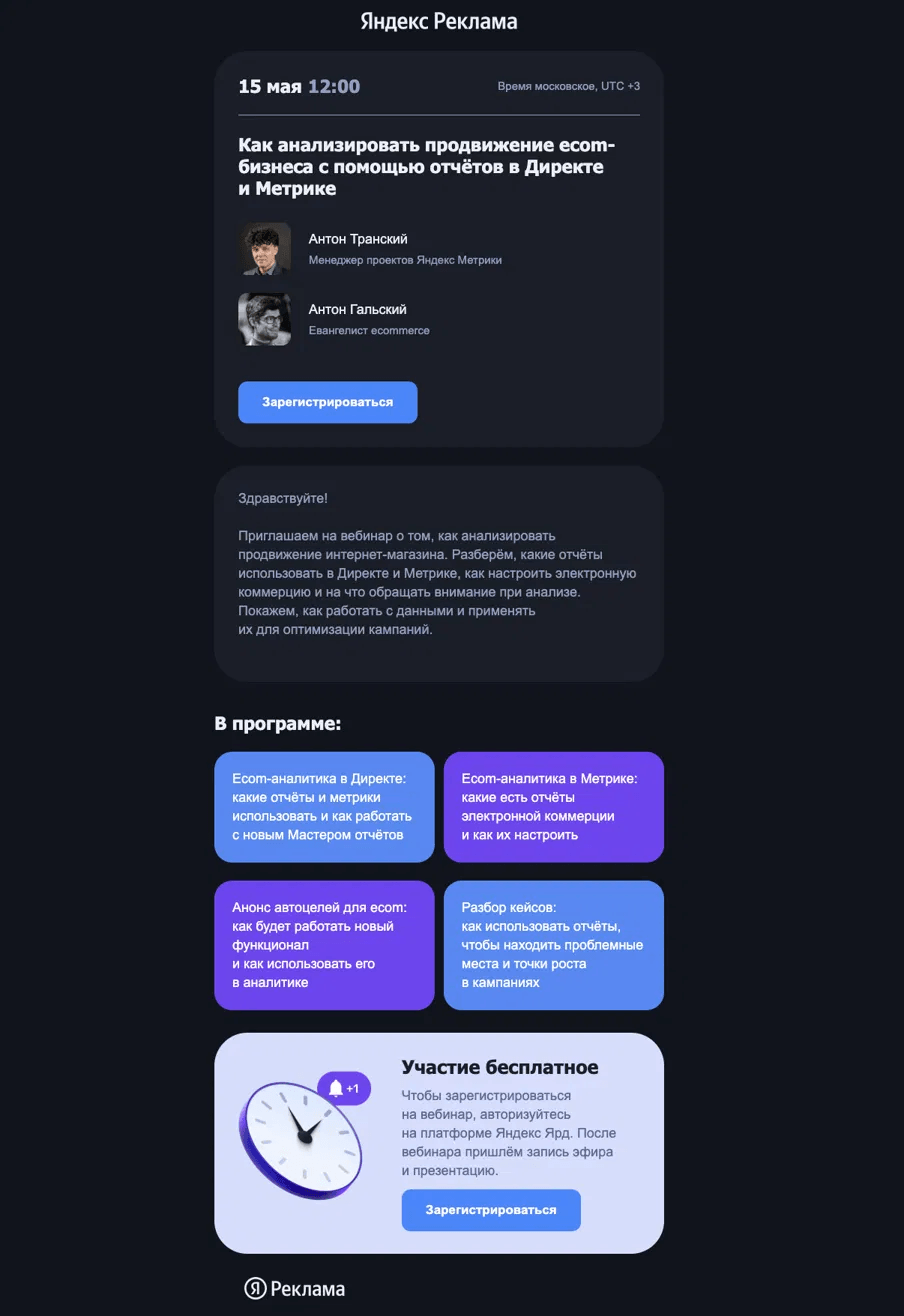
Yandex Reklama puts the date and time at the very top of the email, with speakers right after the headline. The agenda is broken into four blocks so attendees see the specifics before registering.
Second email — the nurture email
7–10 days before the event. Here you can spotlight one speaker, show a fragment of the agenda, or give a concrete example of what the attendee will learn or get. This email only goes to people who haven't registered yet.

WE Platform names the speaker and their role right in the email body, without a separate card block. One paragraph about the meetup topic, then a button. The email isn't overloaded with details.
Third email — the reminder
1–2 days before the event. Just the essentials: date, time, format, stream link, or address. No need to recap the agenda — the person is already registered and has seen it all. Sent to those who registered.

Ecoidea School adds a registration deadline badge right on the banner — the date is visible without reading the text.
On the day of the event
An email 1–2 hours before the start. Just the stream link or a reminder of the address and time. A long email on the day of the event doesn't get read — it's opened at the last moment while looking for one specific thing.
For offline events, add directions or parking information.
After the event
An email 24–48 hours later. Its job is to cement the contact and gather feedback.
What the post-event email includes:
- A recording of the stream or materials from the event (slides, notes)
- A link to a short survey — 3–5 questions, no more
- A next step: a link to the product, the next event, or a useful resource
People who registered but didn't attend also get this email — with the recording and a brief summary of what happened. This audience has already shown interest; something just got in the way.
Subject lines at each stage
The subject line affects Open Rate more than the content does. Each stage of the sequence has its own logic.
Email type | What works in the subject line | Example subject line |
|---|---|---|
Announcement | Date and event name | "Webinar on July 15: how to set up triggered sequences" |
Nurture | Speaker name or talk topic | "Ivan Petrov explains why your emails aren't being opened" |
Reminder | "Tomorrow" or "Today" + time | "Tomorrow at 12:00 — webinar on email analytics" |
On the day of the event | Start time | "In 2 hours: link to the stream" |
After the event | "Recording" or "Materials" | "Webinar recording and speaker slides" |
How not to lose attendees between emails
- Add the stream link to every email in the sequence, starting with the registration confirmation — not just the final reminder
- The registration confirmation email is sent immediately after registration, not a day later
- Registered and unregistered users receive different versions of the nurture email
Common mistakes
- Sending the announcement only a week before the event — part of the audience is already booked
- Duplicating content across different emails in the sequence
- Sending nothing to people who registered but didn't attend
- Making the day-of-event email too long
- Not collecting any feedback after the event
What to check before launch
- The sequence is set up in advance, not on announcement day
- Each email solves one task and doesn't duplicate the others
- The confirmation email is sent immediately after registration
- Registered and unregistered users get different versions of the nurture email
- The day-of-event email contains only the link and the time
- The post-event email goes out within 48 hours, not a week later
- Attendees and no-shows get different versions of the final email
Summary
An event sequence works when each email does the job of its own stage. The announcement attracts, the nurture email keeps interest alive, the reminder counters forgetfulness, and the post-event email cements the contact and moves things forward. A single "about the event" email only does part of that job.
Read also: