
Every email marketer knows this situation: you need to launch an urgent promotion or react to a news hook, but the designer is buried in other tasks, the developer won't be free until tomorrow, and testing the finished HTML in Litmus takes another half a day. The email ends up going out late, by which time the offer has already lost its relevance.
Manually building every email from scratch is the biggest time and budget drain in retention marketing. The solution to this problem is implementing master templates and switching to a modular email architecture.
What a master template is and how it works
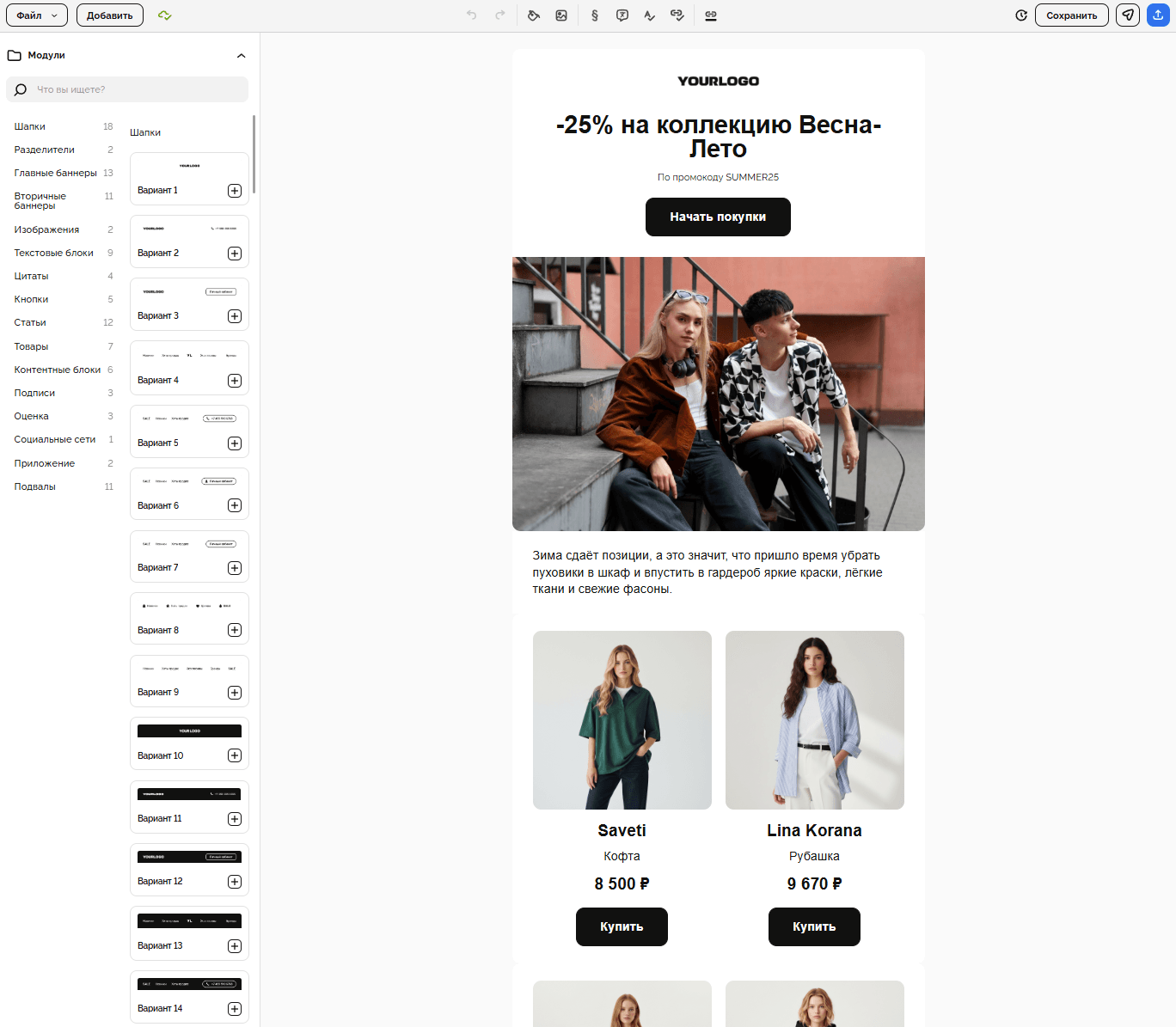
A master template is essentially a LEGO construction set for your newsletters. It's a single large, technically polished HTML file where absolutely every element a company might need has already been designed, coded, and tested: from several header and footer variants to product grids, banners, text blocks, and buttons.
Instead of creating a new email from scratch every time, a marketer simply takes this ready-made framework, keeps the blocks needed for a specific campaign, swaps in the text and images, and removes the rest.
Important: The designer and HTML developer are involved in the process only once — at the stage of designing and building the master template itself. From then on, generating emails becomes a task purely for the marketer or content manager.
Comparison: traditional approach vs. master templates
Parameter | Traditional approach (each email from scratch) | Working with the master template system |
|---|---|---|
Time to create one email | 1 to 3 days (including revisions) | 15–30 minutes |
Production costs | Paying designer and developer hours for every campaign | A one-time investment in building the construction set |
Risk of breaking the layout | High (code is constantly edited by hand for new tasks) | Minimal (all blocks are pre-tested across inboxes) |
Testing (QA) | Required before every send, across multiple devices | Only needs to be checked once, when the master template is created |
Flexibility and speed | Low (hard to ship a newsletter within an hour) | Maximum (an email can be assembled "on the fly" for a news hook) |
How Letteros automates work with master templates
The Letteros platform is built to completely free the team from the routine of manual coding. You can upload your master template to the system, and Letteros will automatically turn it into a convenient visual block editor.
- Intuitive drag-and-drop. A marketer assembles a new email in a visual interface, simply dragging branded blocks from the master template library with the mouse.
- Error protection. Marketers can only edit the content part (text, links, images), without risking breaking brand guidelines or the email's responsiveness on smartphones.
- Automatic content parsing. In Letteros, you can set up smart blocks that automatically pull prices, photos, and product descriptions from your website or a data feed. No more manually copying SKUs and links.
- Collaboration and approval. Right inside the platform, you can leave comments on blocks and get finished emails approved by management, without switching to third-party task managers or messengers.

Common mistakes when implementing master templates
- Building an "infinite" template. Trying to cram 50 block variations into one file, 40 of which will only be needed once a year. The template becomes heavy and bloated. The optimal number is 15–20 universal blocks.
- No strict constraints in the editor. If users are free to change font sizes, line spacing, and colors within modules, your newsletters will lose their unified brand style within a month.
- Ignoring email client limitations. The final HTML weight of an email shouldn't exceed 102 KB (the Gmail limit, beyond which the email gets clipped). The master template should be stripped of excess code, and only the modules actually used should remain when assembling emails in the Letteros builder.
- Rarely updating elements. A company's design system evolves. If the master template hasn't been updated in two years, it will start to look dated. Refresh the blocks at least once a season.
What to include in the ideal master template: an element checklist
A quality email builder should contain the following set of modules:
— Email header (Header): a basic variant with a logo, a menu of the site's main categories, and a web version link.
— Promo blocks: modules for main banners (single banner, banner with offset text, collage).
— Text formats: templates for headings (H1, H2), standard paragraphs, lists, and quotes (for content emails).
— Product grids: responsive layouts for product cards (1 per row for featured items, 2 per row for standard selections, 3 per row for accessories).
— Content special blocks: customer review blocks, blog post teasers, benefit badges (delivery, warranty), and store maps.
— Universal CTA elements: standalone buttons in different sizes (primary bold, secondary outlined) with fixed safe padding.
— Email footer (Footer): a block with the reason for receiving the email, legal information, social media buttons, and a mandatory, clearly visible unsubscribe link.
Summary
Switching to a master template system isn't just about saving money on design and coding — it's a strategic acceleration of your marketing. While competitors spend two days approving a sale layout, a company with a modular builder launches a newsletter in 20 minutes and captures orders while they're still hot.
Letteros takes on the whole technical backend of this process, turning complex code into convenient building blocks for quickly assembling effective emails.