
A technical outage is stressful for everyone. The service doesn't work, customers can't complete the action they need, and support gets flooded with requests. In that moment, the outage email becomes one of the most important pieces of communication a brand sends. Written well, it reduces panic, cuts down the flow of support requests, and preserves trust. Written poorly, it fuels irritation and multiplies complaints.
When you need to send an outage email
Not every technical incident calls for a mass email. The simple rule of thumb: if the outage affects a customer's ability to complete a key action, you need to send an email.
Send an email when the service or its key features are unavailable, when data is lost or at risk of being lost, when delays affect the customer's business, or in the case of security issues and data breaches.
Planned maintenance is a separate scenario. Here, the email goes out in advance, not at the moment of the incident.
The structure of an outage email
The subject line. It should immediately communicate what happened. Not "Important message" and not "Information for users" — that forces people to open the email with no idea what's inside. Be specific: "Technical issues with [feature], we're working on a fix" or "Service outage on June 14 from 10:00 AM to 12:00 PM."
The first paragraph. State the facts of what happened, without extra words. What happened, when it started, who it affects. You don't need to explain the cause in the first sentence — first, the person needs to understand whether this concerns them.
What's happening right now. Is the team working on the problem, is there a workaround, when is a fix expected. If the fix time is unknown, say so. Uncertainty is better than a promise you'll have to break.
What the customer should do. Give specific actions, if any exist: use an alternate login method, wait, save their data, or take no action at all. If there's nothing to do, say that directly too.
A contact. A link to support or an email address for anyone with an urgent question.

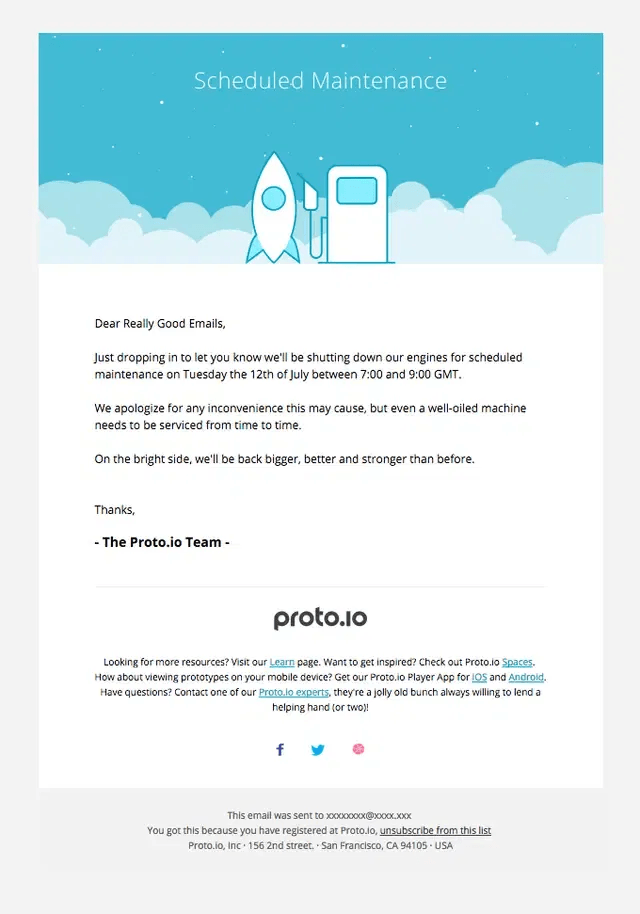
Proto.io's planned maintenance email — the date and time in the first paragraph, a brief explanation, and support links in the footer. The structure is simple: the fact, the context, the next step.
The tone of the email
People read outage emails while irritated. The tone should be calm, direct, and free of corporate jargon.
What works. Directly acknowledging the problem without softening it. "The service is down," not "some users may be experiencing difficulties." Specifics instead of vague promises. Plain, human language, not bureaucratic phrasing.
What doesn't work. Three paragraphs of apology before explaining what happened. Passive voice that hides responsibility: "issues were identified" instead of "we had an outage." The phrase "we sincerely apologize for any inconvenience caused" — readers have seen it hundreds of times, and it carries no meaning.
An apology is appropriate — but a single, short one, and only after explaining what the problem actually was.
The resolution email
Once the problem is fixed, send a second email. Many companies skip this, and that's a mistake. A resolution email closes out the incident and shows the company kept the customer informed all the way through.
What to include: when it was resolved, a brief explanation of the cause if appropriate, what's being done to prevent it from happening again, and compensation or a goodwill gesture if warranted.
There's no need for a detailed technical write-up — most customers don't read postmortems. Two or three sentences are enough.

iCloud's email after restoring service — two paragraphs: the outage is fixed, all messages have been delivered. No filler, just the facts and a thank you for the patience.
Planned maintenance
Planned maintenance is a different scenario. The email goes out ahead of time, not at the moment of the outage.
Optimal timing: 48–72 hours before the work begins. For short overnight maintenance, a day ahead is enough. For longer planned updates, a week ahead.
What to specify: the exact date and start/end time, what will be unavailable, what will keep working, and what the customer should do if the maintenance conflicts with something critical for them.
If the maintenance finishes ahead of schedule, it's good practice to send a short "maintenance completed early" email.

Kaiten's planned maintenance email — a specific time, a list of unavailable features, and a support link for anyone it's critical for. Everything needed, nothing extra.
The security incident email
A data breach or security incident is a special scenario. Here, communication mistakes cost the most.
Send the email as soon as possible after the incident is confirmed. Delay reads as an attempt to hide the problem.
Explain specifically what data was affected. Not "some user data," but "names, email addresses, and encrypted passwords."
Say exactly what to do right now: change your password, enable two-factor authentication, check active sessions.
Provide a contact for questions — a dedicated address or form created specifically for this incident.
How not to write outage emails
Sending it too late. If a customer has already been locked out of the service for three hours and only just got the email, trust is already damaged. The first email should go out within 30–60 minutes of the problem being detected, even if the cause is still unknown.
Promising a specific fix time without being sure. "The service will be restored by 3:00 PM," followed by it not being restored by 3:00 PM, is worse than "we're working on a fix, we'll let you know when it's resolved."
Sending one email to the entire list. If the outage only affected a specific segment of users, only email them. Everyone else shouldn't get an alarming email about a problem that doesn't apply to them.
Downplaying the scope. If every user is affected, write "all users," not "some customers may be experiencing." Readers almost always find out the truth from social media or colleagues, and the gap between the email and reality destroys trust.
Email templates
The outage email
Subject: Technical issues with [feature or service name]
Since [time] today, we've been experiencing issues with [what specifically isn't working]. This affects [who it affects].
Our team is already working on a fix. Expected resolution time: [time or "we'll update you soon"].
Until the issue is resolved, you can [an alternate action or "there's nothing you need to do"].
If you have an urgent question, write to us at [email] or [support link].
We'll let you know as soon as the situation changes.
The resolution email
Subject: Service restored
As of [time] today, we've resolved the issue with [what wasn't working]. The service is now running normally.
Cause of the outage: [brief explanation].
What we've done to prevent this from happening again: [one or two sentences].
Thanks for your patience.
Bottom line
An outage email is a tool for managing trust during a crisis moment. Fast, specific, with a clear next step — and the customer stays on your side, even while the service is down.
Also read: