
Consent to receive emails isn't just a legal formality. A subscriber who knowingly agreed to receive emails opens them more often, complains about spam less, and stays on the list longer. Let's break down how to get consent the right way — both legally and from a marketing perspective.
Why you need consent
Sending emails without consent isn't just against the law — it's also bad practice from a deliverability standpoint. People who aren't expecting your emails file spam complaints. Complaints hurt your domain's reputation, and eventually emails stop reaching even those who did opt in.
In Russia, email campaigns are regulated by two laws. The Federal Law "On Advertising" requires obtaining the recipient's consent before sending — and it's the sender's job to prove that consent existed. The Federal Law "On Personal Data" requires explaining why the company collects and uses contact information.
The fines under both laws are substantial. And they aren't issued automatically — a single complaint from a recipient is enough to trigger an investigation. So even a small number of unhappy subscribers can lead to serious consequences.
Types of consent
Explicit consent (opt-in). The person actively performs an action: checks a box, clicks a "Subscribe" button, confirms their email via a link. This is the best option — the subscriber consciously agrees.
Double opt-in. After subscribing, the person receives an email with a confirmation link and only joins the list after clicking it. This reduces the number of subscribers, but sharply improves list quality — only people who genuinely want to receive emails remain.
Soft opt-in. An existing customer who has already bought from you can receive emails about similar products and services. This is allowed by law, provided there's a simple way to opt out.

A form with unchecked checkboxes — the person ticks the consent box themselves. This is the right approach: consent should be a conscious action, not unchecking a pre-checked box.
What a proper subscription form looks like
The subscription form is the first point of contact with a future subscriber. How it's designed affects both conversion and list quality.
What the form should include.
An email field — don't ask for unnecessary data. Name is optional. Phone number and date of birth are unnecessary at the subscription stage and put people off.
A consent checkbox — separate, not combined with other terms. The wording should be clear: "I agree to receive emails from [company name]". The box shouldn't be checked by default.
A link to the privacy policy — next to the checkbox. The person should understand what happens to their data.
A button with a clear action — "Subscribe", "Get the collection", "I want emails". Not "Submit" or "OK".
What to say about the campaign. The subscriber should understand exactly what they'll be receiving. "Subscribe to our news" is weak. "A weekly roundup of useful articles on email marketing" is strong. The more specific the promise, the higher the conversion and the lower the unsubscribe rate.

MIF's subscription form — two separate checkboxes for consenting to emails and to personal data processing. The boxes aren't checked by default, and the privacy policy link sits right next to them.
Double opt-in: pros and cons
Double opt-in is often seen as an extra barrier. In reality, it's a tool that improves list quality.
Pros. Only real addresses end up on the list — no typos or disposable mailboxes. Subscribers are more engaged, because they took two actions instead of one. Domain reputation is higher, because there are fewer spam complaints. It's easier to prove consent existed if a complaint comes in.
Cons. The list grows more slowly — some people never confirm their subscription. The confirmation email needs to be well designed, or it will land in spam and the person will never complete the subscription.
For most niches, double opt-in is the right choice. The exception is when list growth speed is critical and you're willing to accept lower quality.

A subscription confirmation email from Ostrovok — a lively subject line, short copy, and one button. Everything it needs: no extra information before the person confirms their address.
How to design a confirmation email
The confirmation email is the most important part of the double opt-in chain. If it lands in spam or is confusing, the person won't complete the subscription.
A few rules.
Send it immediately after the form is filled out — the person still remembers subscribing. A delay of a few hours sharply lowers confirmation rates.
The subject line should be clear: "Confirm your subscription to [name]" or "One click and you're on the list". Not "Welcome" — the person hasn't confirmed they want to be on the list yet.
The button should be noticeable, with clear text: "Confirm subscription", "Yes, I want to receive emails". Duplicate the link as text below the button, in case it doesn't render.
Explain what happens after confirming. What the person will start receiving, how often, and how to unsubscribe.
Where to collect consent
A form on the website. The most obvious method — a pop-up form, a footer block, or a dedicated subscription page.
At checkout. A separate "I want to receive emails" checkbox — not combined with data-processing consent and not checked by default.
A lead magnet. The person leaves their email in exchange for something useful — a checklist, a guide, a discount. Important: the form must clearly state that after receiving the material, the person will start receiving emails.
Offline. A questionnaire at an event or point of sale. Consent needs to be recorded — a signature or a checked box on the form. Without this, you can't send emails.
Social media and messengers. A post or message inviting people to subscribe — the person goes to a form and leaves their email. Collecting addresses directly, without a form, doesn't provide documented consent.

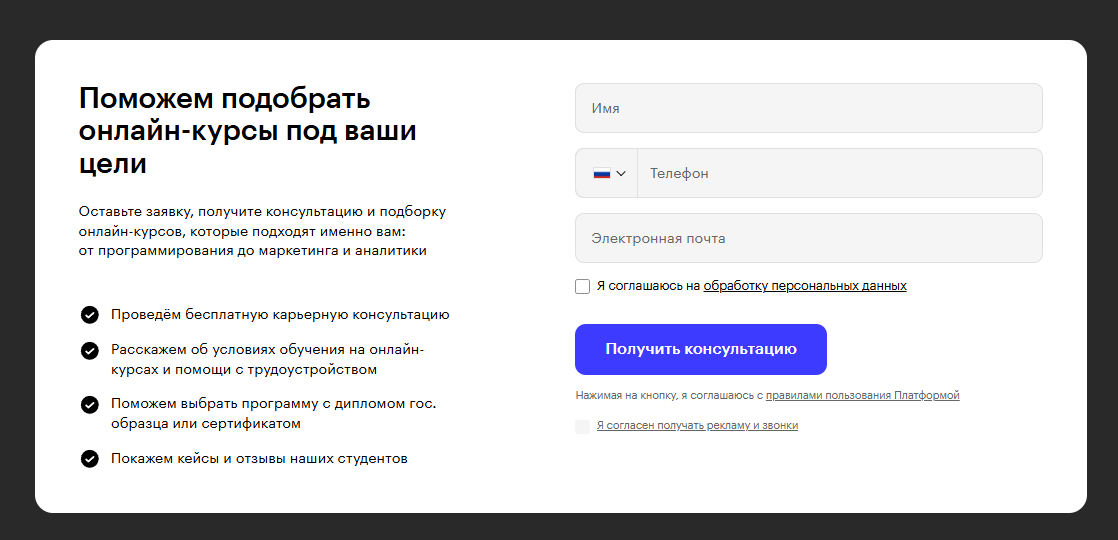
A course sign-up form with a separate checkbox for receiving news and offers. Consent to emails isn't combined with the terms of service and isn't pre-checked.
How to store proof of consent
The fact of consent needs to be recorded and stored. If a complaint or an audit comes in, you need to be able to prove you had permission to send.
What to record: the date and time of subscription, the source (which form, which page), the IP address, and the version of the consent text the person saw at the moment they subscribed.
Most ESPs and CRMs store this data automatically. Make sure your service does this and doesn't delete the history when someone unsubscribes.
Bottom line
Properly obtained consent is the foundation of a healthy list. A subscriber who knowingly agreed to receive emails will actually read them. And double opt-in, a clear form, and an honest description of the campaign are simple tools that make a list high-quality from day one.
Read also: