
When an email lands in someone's inbox, the reader sees three elements: the sender's name, the subject line, and the preheader. The decision to open or skip it happens in seconds — and the preheader influences that decision just as much as the subject line.
What a preheader is
The preheader is the text that displays in the inbox list right after the subject line. In Gmail it appears in gray text; Apple Mail and Yandex Mail work similarly.
If no preheader is set, the email client automatically pulls the first words from the email body. Most often, that's something like "If this email doesn't display correctly, click here" or "View in browser." These words don't help get the email opened.
A preheader is 80–140 characters of extra real estate that most companies don't use.
How a preheader differs from a subject line
Subject lines and preheaders solve different problems and should complement each other, not repeat the same thing.
The subject line states the main point: what the email is about, what the offer is, what the benefit is. The preheader builds on the subject line: it adds detail, creates intrigue, or introduces a second argument.
Bad: subject line "30% off all courses" and preheader "30% off all courses, today only." That's duplication — the reader gets no new information.
Good: subject line "30% off all courses" and preheader "Choose from 200 programs — offer ends Friday." The preheader adds specifics and a deadline.

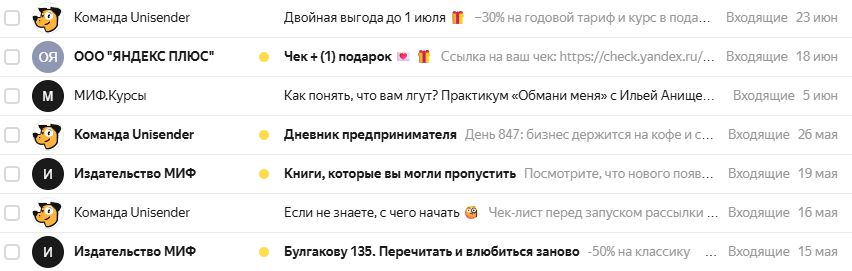
An inbox list in Yandex Mail — subject line and preheader side by side. "An entrepreneur's diary" adds specifics to the subject line, "Books you might have missed" previews the content. "Receipt + (1) gift" loses its preheader — a technical link shows up instead.
How many characters to use
The visible length of the preheader depends on the email client and device.
On desktop in Gmail, about 100–110 characters are visible together with the subject line. On mobile, it's less — around 50–90 characters, depending on the subject line's length.
A practical rule: put the most important part in the first 50–60 characters of the preheader. Anything after that risks getting cut off.
You can write a longer preheader to fill the empty space and stop the email client from pulling in stray text from the body. But the opening needs to work on its own.
How to write a preheader
Build on the subject line, don't repeat it. If the subject line names a problem, the preheader hints at a solution. If the subject line names an offer, the preheader adds a condition or a deadline.
Subject line: "Why your emails aren't getting opened" Preheader: "5 subject line mistakes that kill your open rate — and how to fix them"
Name specifics. Numbers, deadlines, and names work better than vague phrases.
Bad: "Lots of interesting stuff inside" Good: "3 case studies, a checklist, and a breakdown of mistakes in real emails"
Use a question. A question in the preheader creates an open loop — the reader wants to find out the answer.
Subject line: "How we grew 3x in six months" Preheader: "And why the first two months were a disaster"
Create urgency honestly. A deadline in the preheader works only if it's real.
Subject line: "Summer sale" Preheader: "Up to 40% off — last day, ends today at 11:59 PM"
Personalize it. If your list has names, you can insert them into the preheader the same way you would in the subject line.
Subject line: "Valeria, your order has shipped" Preheader: "Expected delivery date: June 15"
Preheader formats for different email types
Promo email. The preheader adds the offer's condition, deadline, or specifics. Subject line: "Black Friday at Letteros" Preheader: "40% off the annual plan — November 24 only"
Content newsletter. The preheader previews the issue's main story or creates intrigue. Subject line: "Digest: this week in email marketing" Preheader: "Why Apple Mail breaks every other email — and what to do about it"
Trigger email. The preheader adds context or the next step. Subject line: "You checked out this course" Preheader: "Only 3 spots left at the old price"
Transactional email. The preheader states a key detail. Subject line: "Your order #12345 is confirmed" Preheader: "Delivery June 15–17, courier will call an hour ahead"
Reactivation email. The preheader reinforces the emotion or gives a concrete reason to come back. Subject line: "It's been a while since you opened one of our emails" Preheader: "Since then, we've launched 12 new features — here are the highlights"
Technically: how to set a preheader
The preheader is set in the email's HTML code using a special hidden block at the start of the body.
<div style=»display:none;max-height:0;overflow:hidden;»>
Your preheader text here
</div>
This text doesn't display in the email's body, but the email client reads it and shows it in the preview.
In most editors, including Letteros, the preheader is set in a separate field — there's no need to touch the code by hand.
Empty characters are added after the preheader to stop the email client from pulling in text from the body:
‌ ‌ ‌

What doesn't work in a preheader
Repeating the subject line. "30% off" in the subject line and "30% off all products" in the preheader is wasted space.
An empty preheader. The email client will pull in "Unsubscribe" or "View in browser" — which looks unprofessional.
Clickbait with no payoff. "You won't believe what we came up with" is annoying and gives no information.
A preheader that's too long, with the important part at the end. If the main point comes after character 80, nobody will see it.
The bottom line
The preheader is 80–140 characters that most companies leave empty. A good preheader builds on the subject line, adds specifics, and gives the reader a second reason to open the email. A bad preheader — or none at all — is a missed opportunity with every single send.
Read also: