
The legal block in an email isn't decoration or a formality. It protects the company from claims, reduces spam complaints, and helps the email get past mail service filters. Let's break down what's mandatory, how to format it, and where to place it.
What every email should include
Russian law and the requirements of major mail providers — Gmail, Yandex, Mail.ru — impose specific requirements on email campaigns. Missing required elements increases the risk of landing in spam or getting a complaint.
An unsubscribe link. A mandatory element. The recipient must be able to opt out in one click — no registration, no confirmation, no need to explain why. The "Unsubscribe" button or link needs to be visible and functional.
Since late 2025, Gmail and Yahoo have moved to hard enforcement. If a bulk sender (5,000+ emails a day) lacks the technical List-Unsubscribe-Post header, or configured SPF, DKIM, and DMARC records, mail services block delivery entirely rather than just sending emails to spam. Most ESPs add these headers automatically, but the domain owner needs to configure the DNS records.
The sender's physical address. A CAN-SPAM Act requirement — a U.S. law that most major ESPs follow. The company's legal or mailing address needs to appear in the email. For Russian companies, this also lowers the risk of being flagged as spam.
The company or sender's name. The recipient needs to understand who sent the email. The sender's name in the "From" field and a mention of the company in the body or footer are both required.
The reason for receiving the email. A short phrase explaining why the person is getting this email. "You're receiving this email because you subscribed on letteros.com" reduces spam complaints because it reminds the subscriber of their own action.

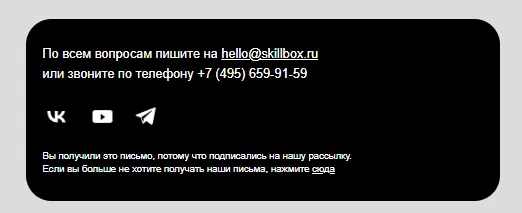
Skillbox's footer — the reason for receiving the email and the unsubscribe link in one block.
How to format the unsubscribe block
The unsubscribe link should be visible, but not shouty. Hiding it is bad practice: a person who can't find the unsubscribe link clicks "Spam" instead. That's worse for domain reputation than losing a subscriber.
What works. Text like "Unsubscribe" or "Stop receiving these emails" as a hyperlink. Font size at least 10px. A color that contrasts with the background — the text shouldn't blend into it.
What doesn't work. A white link on a white background. Text like "Click here to stop receiving our wonderful emails" — that's manipulation readers can spot. A link that leads to a five-field form instead of an immediate unsubscribe.
After unsubscribing, the person should get a confirmation — a page or email saying "You've unsubscribed". This closes the loop and reduces the chance of a repeat complaint.
Important under the law and ESP rules: you're required to remove the user from your list within 48 hours (2 days) of them clicking unsubscribe. Delaying this leads to blocks from Gmail and Mail.ru.
Ad labeling
Since September 1, 2022, Russia has had a law requiring mandatory labeling of online advertising (the Advertising Law, amendments to Federal Law 347-FZ). Email campaigns with advertising content fall under it.
What this means in practice.
An "Advertisement" label. A promotional email must carry an "Advertisement" label and identify the advertiser. Informational and transactional emails don't fall under this law.
An ERID token. Every ad placement must receive a unique identifier — an ERID token — through the ORD system (advertising data operator). The token is placed in the email, usually in the footer.
Reporting. Data about the ad placement is submitted to the ERIR (unified register of online advertising) through the ORD.
An important clarification: if a campaign goes out to your own contact list and covers exclusively your own products, services, or webinars, it doesn't need to be labeled. The FAS officially treats such emails as information, not advertising — no ERID token or ERIR reporting is required here. Full labeling (with the token and the "Advertisement" mark) is required only if you're sending a partner's advertising to your list for money or in exchange for something. Also keep in mind that distributing someone else's paid advertising online now incurs a 3% ad levy.

An example of required ad labeling in an email — an "Advertisement" mark with the advertiser's legal name and tax ID.
Privacy policy
A privacy policy link in the email is good practice, especially if the email tracks data: clicks, opens, and views.
The policy explains what data the company collects, how it's used, and how it's stored. Under the "On Personal Data" law, the company is required to inform users about how their data is processed.
A short link in the footer is enough: "Privacy Policy". The full text is hosted on the website.
How to design the footer
The footer is where all the legal information lives. It needs to be readable, but not overloaded.
A typical footer structure.
Company name and legal address.
The reason for receiving the email — one sentence.
The unsubscribe link.
A link to the privacy policy.
An ERID token and "Advertisement" label, if the email is promotional.
Footer font is usually smaller than the body text — 10-12px. The color should be muted but readable — not light gray on a white background. All links should be clickable and checked before sending.

Yandex Afisha's footer — the company's legal name, a breakdown of the promotion's terms, an age rating, and an unsubscribe link.

MIF's footer — ad labeling with the company registration number, promotion terms with asterisks, an unsubscribe link with human-friendly wording.
Transactional emails
Transactional emails — order confirmations, password resets, payment notifications — are regulated more loosely than promotional campaigns. They're sent in response to a user's action and aren't considered advertising.
Even so, they should still include a link to unsubscribe from notifications, if the user wants to turn them off, along with a brief explanation of why the email was sent.
What to check before sending
- The unsubscribe link is present and works correctly.
- After unsubscribing, a confirmation page opens.
- The footer states the company name and address.
- There's an explanation of why the person is receiving this email.
- If the email is promotional, it carries an "Advertisement" label and an ERID token.
- The privacy policy link points to a current page.
- Whether SPF, DKIM, and a DMARC policy are configured for the domain (without them, in 2026, Gmail and Yahoo will simply block the emails).
- Whether automatic unsubscribing from the list is configured within 48 hours.
Bottom line
The legal block in an email takes up just a few lines in the footer, but it affects deliverability, domain reputation, and protects the company from claims. Set it up once in the template, and you won't have to think about it with every send.
Read also:
- How to Properly Get Consent for Your Email List
- Why Emails Land in Spam in 2026: 8 Reasons and How to Fix Them
- What Are SPF, DKIM, and DMARC: A Simple Explanation for Marketers
- Email Deliverability Rules: How to Ensure Delivery to Gmail and Yahoo Subscribers
- Email List Validation: How to Clean a List of Junk Addresses