
For service businesses, email solves three specific tasks: help a customer book an appointment, keep them from forgetting about it, and collect feedback afterward. Everything else is a nice bonus.
That said, services have a quirk e-commerce doesn't: the customer doesn't get a physical product they can touch. Trust is built through communication before and after the visit.
Booking emails
Booking confirmation
Sent right after the customer books. Its job is to confirm the booking was received and provide all the necessary information.
- Date, time, address, or a link for an online meeting
- The specialist's name, if applicable
- What to bring or how to prepare
- A contact for rescheduling, if needed
The email should be short. The customer knows why they booked — there's no need to recap the service description. They just need the visit details.

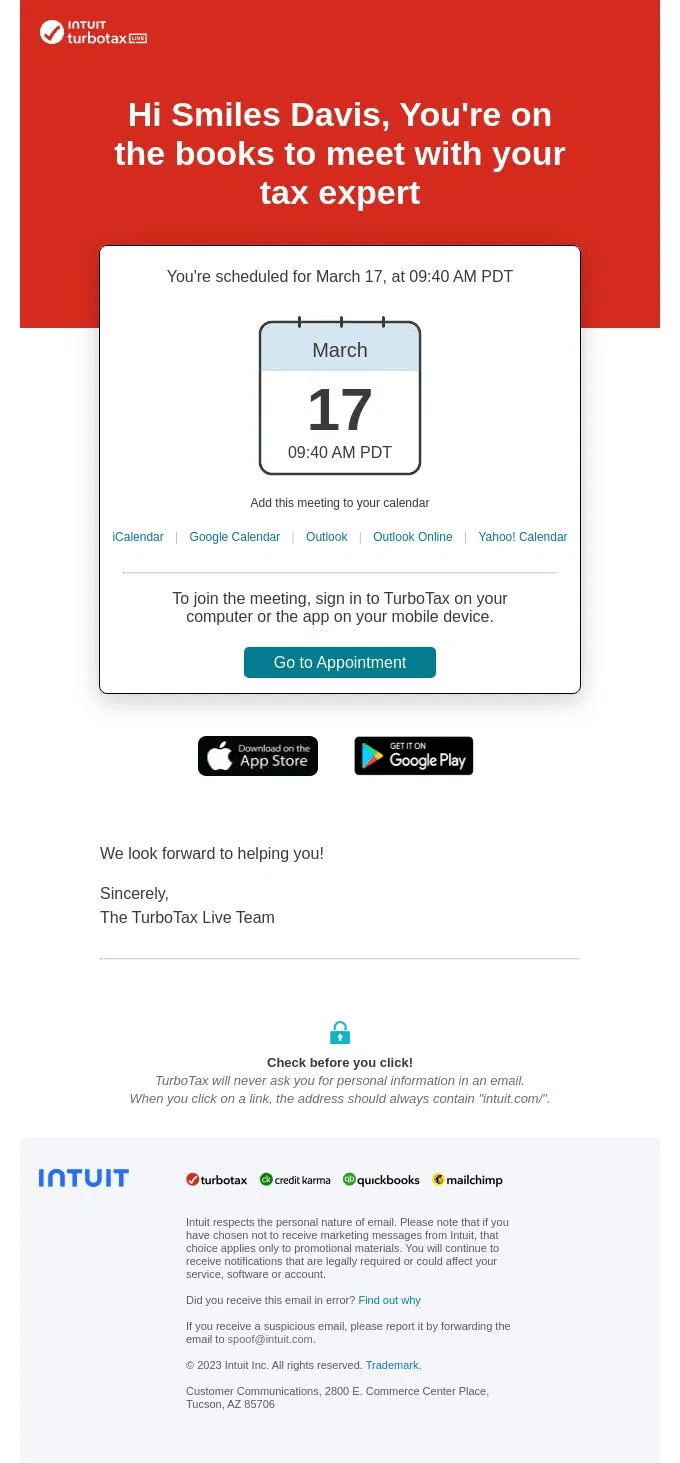
TurboTax puts the date and time front and center and immediately provides add-to-calendar links — the customer doesn't need to search for anything
A link for online booking
If you don't have a CRM with automatic sending, create an email with a button that leads to a booking form. That could be Calendly, Yclients, an embedded form on your site, or Google Forms.
How to create an "Add to calendar" link: letteros.com/blog/instructions/kak-sozdat-ssylku-dobavit-v-kalendar/
Appointment reminders
According to data from medical clinics and beauty services, reminders reduce no-shows by 30–50%. That's real money.
When to send
Reminder | When | What to include |
|---|---|---|
First | 24–48 hours before | Date, time, address, option to reschedule |
Second | 2–3 hours before | Time, address or link, contact info |
SMS/Push | 1 hour before | Short text: time and address |
It's better to send the one-hour reminder via SMS or push — email doesn't get read fast enough for that.
Reminder tone
Not formal, not pushy. "Hi there, just a reminder about your appointment" works fine. "We strongly urge you to arrive at the scheduled time" creates tension where there shouldn't be any.
Post-visit emails
Thanks for the visit
Sent the day of the visit or the day after. It's not mandatory, but it works well for retention — the customer gets a sign of attention right after they've already paid.
What to write: a short "thank you," the specialist's name if applicable, what to do if questions come up. Don't rush to suggest booking again right away — give it a day or two.
Review request
The best-converting time to ask is 1–3 days after the visit. The impression is still fresh, and the customer still remembers the details.
- One link — to the specific platform where you need the review (Google, Yandex, 2GIS)
- No long forms in the email. One click — straight to the review page
- A personal message from the specialist or receptionist works better than a generic "the clinic team"

Eventbrite: a personal message, one button, and an honest "this will take less than a minute" — no long forms or explanations of why the review is needed
Repeat visit reminder
For services with a regular cycle — a haircut, manicure, medical checkup, equipment maintenance — an automatic reminder after the expected interval works better than generic campaigns.
"It's been 6 weeks since your last haircut — time to book?" with a booking button. This isn't advertising, it's thoughtfulness.
Seasonal and special communications
- A birthday greeting. With a small bonus — a discount or gift for a visit during their birthday month. Not just a card with no offer
- A promotion for long-time customers. "We haven't seen you in a while — a special price just for you." Works better than a mass campaign
- Announcing a new specialist or new service. You can offer your warm list early access or a special price on something new
How to build the system
For service businesses, most emails are transactional and trigger-based. They fire off an event: booked an appointment, showed up, hasn't been in for a while.
Templates for each email type are built once in Letteros, exported to your CRM or ESP, and then run automatically. All that's left for the marketer is to keep an eye on the metrics and update the copy.
More on email automation: letteros.com/blog/sovety/avtomatizacziya-email-rassylok-s-kakih-sczenariev-nachinat-i-pochemu/