
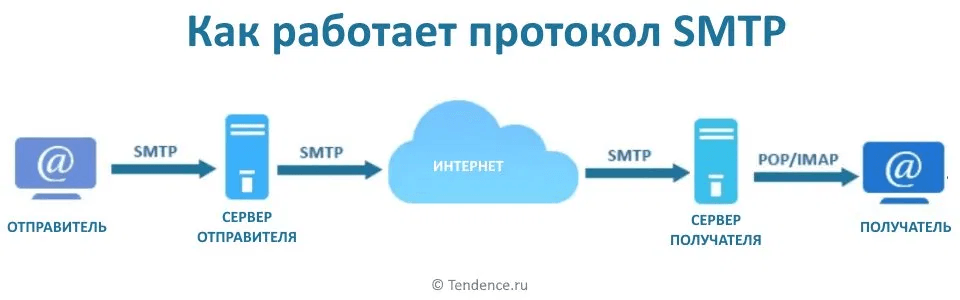
Every time you send an email, it passes through several servers before reaching the recipient's mailbox. SMTP is the protocol that manages this process. Let's break down how it works and why it matters for email marketing.
What SMTP is
SMTP stands for Simple Mail Transfer Protocol. It's a set of rules that mail servers use to exchange emails with each other.
An analogy: imagine SMTP as a mail carrier. It picks up a letter from the sender, takes it to the post office, which forwards it to another branch, which delivers it to the recipient. SMTP does the same thing, just with emails and in a matter of seconds.
The protocol has existed since 1982 and remains the primary standard for sending email to this day.
How SMTP works
When you click "Send", here's what happens.
Your email client — Gmail, Outlook, Yandex Mail, or an ESP — hands the email off to the sender's SMTP server.
The SMTP server checks the recipient's address and locates the mail server responsible for that domain. For an @gmail.com address, for example, that's Google's servers.
The sender's server establishes a connection with the recipient's server and transfers the email.
The recipient's server accepts the email and places it in the recipient's mailbox. At this point, SMTP's job is done. Retrieving the email from the mailbox is the job of other protocols, IMAP or POP3.

How SMTP differs from IMAP and POP3
These three protocols — SMTP, IMAP, and POP3 — are often confused. The difference is simple.
SMTP is only responsible for sending emails. It transfers an email from sender to recipient.
IMAP and POP3 are responsible for retrieving emails. They let an email client fetch emails from the server and show them to the user.
Roughly speaking: SMTP is outgoing mail, IMAP and POP3 are incoming.
The SMTP server: what it is and why it's needed
An SMTP server is software that accepts emails from clients and passes them along. Without an SMTP server, an email won't go anywhere.
There are two options.
A provider's built-in SMTP. When you send an email through Gmail or Yandex Mail, they use their own SMTP servers. This is enough for regular correspondence.
An external SMTP server. For mass email campaigns, specialized services are used: SendGrid, Mailgun, Amazon SES, Unisender, Postmark. They're optimized for high sending volumes and provide detailed deliverability statistics.
SMTP ports
SMTP operates on several ports, each with its own purpose.
Port 25 — historically the main port for transferring emails between servers. Most internet providers block it to prevent spam.
Port 587 — the standard port for sending emails from a client to a server. Used with mandatory authentication. Recommended for setting up email campaigns.
Port 465 — a port for an encrypted SSL connection. Used to be common, now being replaced by port 587 with TLS encryption.
For most purposes, it's enough to know: set up your campaigns through port 587.
SMTP authentication
For a server to accept an email, the sender needs to pass authentication — confirming they are who they claim to be. Three DNS records are used for this.
SPF — a list of servers allowed to send emails on behalf of a domain. If an email arrives from a server not on the list, it gets flagged as suspicious.
DKIM — a digital signature for the email. The recipient can verify that the email was genuinely sent from the stated domain and wasn't altered along the way.
DMARC — a policy that specifies what to do with emails that fail SPF and DKIM checks: accept them, send them to spam, or reject them.
Without these records, emails are highly likely to land in spam — regardless of content.
SMTP in email marketing
A personal mailbox isn't suited for mass email campaigns. Gmail limits sending to 500 emails a day, Yandex has similar limits. For a campaign to a list of thousands of addresses, you need a specialized SMTP service.
ESPs — email campaign services — take care of the entire infrastructure: SMTP servers, send queues, deliverability monitoring. Letteros lets you build an email and export it to any ESP for sending.
When choosing an SMTP service, pay attention to three things: sending limits, IP address reputation, and the availability of deliverability monitoring tools.
Common SMTP problems
Emails aren't sending. Most often the cause is incorrect settings: the wrong port, an incorrect login or password, or a port blocked by the provider.
Emails are landing in spam. SPF, DKIM, or DMARC aren't set up. Or the IP address has a poor reputation due to previous spam campaigns sent from it.
Emails aren't arriving. The SMTP server's IP address has landed on a blacklist. You can check this using MXToolbox or Mail Tester.
Slow sending. The server is overloaded or emails are stuck in a queue. Urgent transactional emails — confirmation codes, notifications — need a priority queue separate from marketing campaigns.
Bottom line
SMTP is the basic protocol without which email wouldn't work. For regular correspondence, it runs invisibly. For marketing campaigns, it's important to understand how to configure it: the right DNS records, choosing a specialized service, and monitoring deliverability — these are the fundamentals that determine whether your emails reach readers.
Read also:
- What Are SPF, DKIM, and DMARC: A Simple Explanation for Marketers
- Why Emails Land in Spam in 2026: 8 Reasons and How to Fix Them
- Checking Email Delivery: How to Know an Email Was Delivered
- Domain Verification: A Guide to Verifying Your Domain for Sending Emails
- Email Deliverability Rules: How to Ensure Delivery to Gmail and Yahoo Subscribers