

And why it matters when building an email campaign.
Minification (or minimization) of code is the process of reducing its size by removing unnecessary characters. Minification lets you shrink a file's size without losing functionality and speeds up its loading.
JavaScript and CSS are the files most commonly minified.
How it works
Standard code with readable variable names, spaces, and line breaks is easy for a person to understand. A computer processes it slowly and with difficulty, since every character takes up space in memory. The heavier the file, the slower the computer loads it.
During code reduction:
- extra lines, line breaks, commas, spaces, and comments are removed;
- variable names are shortened to a single character;
- the names of colors and other entities are simplified.
It's important to understand that simplification is not followed by compression or a format change. Only editing takes place.
What it's for
When it comes to building emails, minification speeds up email loading, reduces traffic consumption, and helps you stay within the file size limit on various email platforms. Let's look at each point in more detail.
Faster loading
When a user opens an email, they immediately see its full content — they don't have to wait for the message to load and the image to finally appear on their phone or computer screen. This helps companies avoid unsubscribes and boost open rates.
Reduced traffic consumption
Because the email's weight is lower, users consume less traffic processing its data.
Email client limits
Sometimes a person opens an email and can't read it all the way to the end. Instead of the full message, they see a "Message clipped" notice with a link to the full text. To avoid this, the file needs to fit within 100–102 kilobytes. You can do this with a special service for minification — it can save you up to 20% in kilobytes.
Minification example
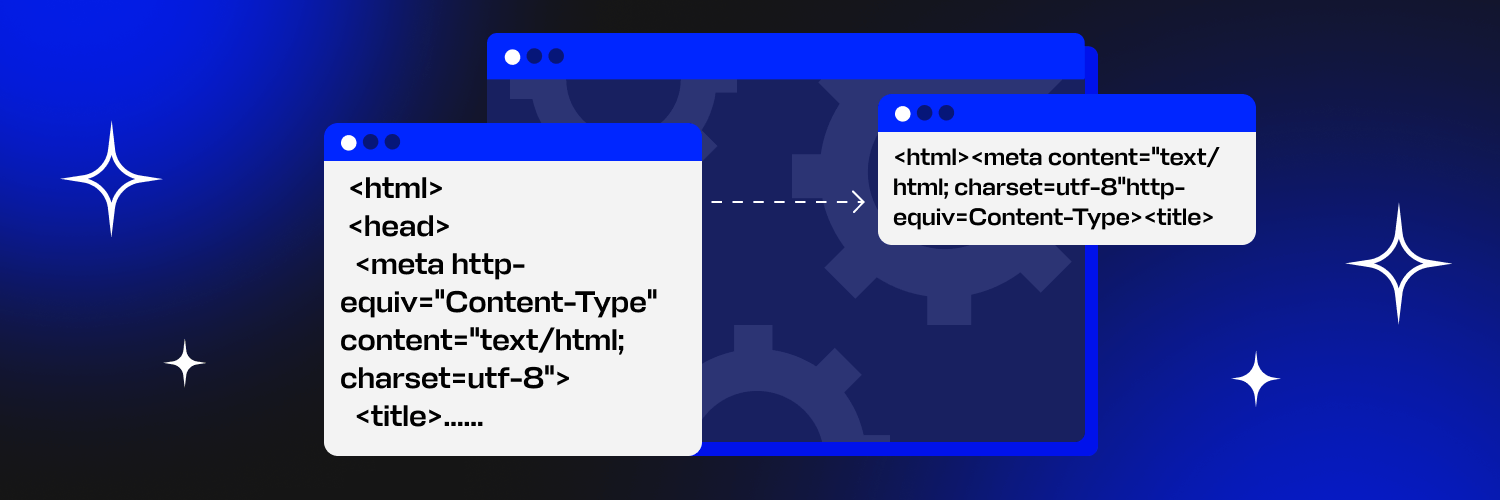
Here's what the code looks like before minification
And here's what it looks like after it's been reduced
The code becomes unreadable for a human but ideal for various devices to process. It's worth noting that this format isn't meant for further editing. Once the code is uploaded to the server, no one works with it anymore. So if the data needs to change, it's rewritten in the developer version and then minified again.
How it's implemented in the Letteros editor
When working in Letteros, there's no need to switch to separate services to reduce a file's size.
- The user builds the email in the builder and can edit any block of the message in the editor mode.
2. When exporting the email, the code is minified by default. But if you want, you can remove this setting with a single click.

Letteros also has a tool for compressing images — pictures in the email will weigh much less and load much faster.
Conclusions
For emails to display correctly and quickly on users' devices, you need to stay within the allowed weight limit. To fit within the required size, you can minify the code. Removing extra characters and shortening possible entities reduces the email's size, which improves how it loads in email clients.
When developing a template in Letteros, tags and styles that can be dropped are removed. This automatically reduces the size of future emails. The editor also lets you test how emails display across all popular email clients and 100+ devices, so you can be confident your campaign renders correctly.
You can try out Letteros' functionality for free with the demo version of the editor.