
AIDA is a formula that describes a person's journey from first contact with a message to the target action. It works well in email marketing because an email is a linear format: the reader moves from top to bottom, and every block needs to hold their attention and lead them to the next one.
What AIDA stands for
A — Attention. Grab the reader's attention. In an email, that's the job of the subject line and preheader. Inside the email, attention is captured by the heading and the first paragraph.
I — Interest. Hold the reader and make them want to keep reading. Here it's important to talk about a problem or task relevant to the recipient, not about the product itself.
D — Desire. Create a desire for what's being offered. At this stage you show benefits, results, and proof.
A — Action. Call for a specific action. One button, one clear verb, one next step.
How AIDA works in an email
Let's break it down using an example email from an online school announcing a course.
Subject line (Attention) "You're spending 3 hours on something that takes 20 minutes"
The subject line hooks readers because it talks about wasted time. The reader opens the email.
First paragraph (Interest) "Most marketers spend hours creating content by hand. Meanwhile, there are tools that do the same thing faster — and some of them are free."
There's no course advertising here. There's a problem the reader has run into.
Middle section (Desire) Concrete results: "After the course you'll cut your content creation time by 3x," student testimonials, work samples, a deadline or limited number of spots.
Button (Action) "Sign up for the course" — one button, a clear next step.
A screenshot could go here. An example email with a clear AIDA structure — a hooky headline, a problem, benefits, and one button. Among materials already found, an email from MYTH announcing a course or workshop would fit well.
Attention: subject line and preheader
An email subject line should do one of three things: state a concrete benefit, create intrigue, or name a problem relevant to the reader. People have learned to ignore manipulative phrases like "Urgent," "Just for you," or "Don't miss out."
The preheader reinforces the subject line or adds a second argument. If the subject line names a problem, the preheader can hint at the solution.
Example. Subject: "Why your emails don't get opened." Preheader: "5 mistakes that kill your open rate, and how to fix them"
Interest: talk about the reader, not about yourself
The most common mistake at the interest stage is starting with a story about the company or the product. "We're excited to announce," "Our company has launched," "We've developed" — the reader closes the email because they don't see why it matters to them.
Interest is held by whatever touches the reader directly. A problem they know. A situation they've been in. Formats like "You've probably run into…" or "Most [target audience] do it this way, and here's why it doesn't work" tend to work well.
Desire: benefits, not features
At the desire stage, people often list product features: "8 modules," "12 hours of video," "6 months of access." That's a description, not a benefit.
A benefit answers the question "what's in it for me?" Not "8 modules," but "in 8 weeks you'll build a system that runs without your constant involvement." Not "12 hours of video," but "you'll spend 1.5 hours a day and get a finished result in a month."
Proof reinforces desire: numbers, concrete results, testimonials from real people, before-and-after comparisons.

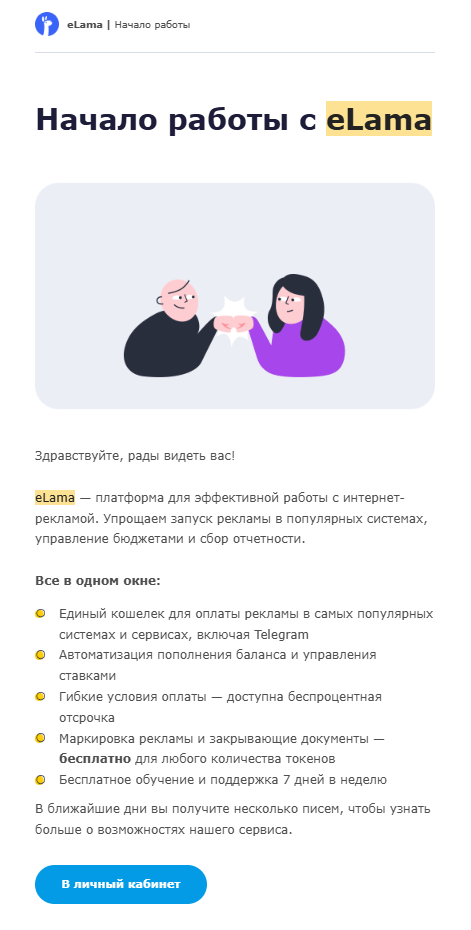
An email from eLama — the "Everything in one window" block with concrete benefits for the user rather than abstract product features.
Action: one button, one step
The main mistake at the action stage is having several buttons with different calls to action. "Buy," "Learn more," "View the program" — the reader doesn't know which one matters more, and clicks nothing.
Most emails should have one button with one action. The button text should say what happens after the click: "Sign up for the course," "Get the discount," "Download the guide" — not just "Learn more."
It's best to place the button after the desire block, once the reader already understands the value. If the email is long, you can repeat it at the end.
Variations of AIDA
AIDCA — Conviction is added between desire and action. This is proof that removes any remaining doubt: guarantees, certificates, social proof.
AIDAS — Satisfaction is added after action. In email, this is the confirmation message after a purchase or signup that reinforces a positive impression.
AIDPPC — an extended version with Pain, Proof, and Close. Used in long sales emails.
For most tasks, the basic AIDA is enough. It only makes sense to complicate the formula for expensive products with a long decision cycle.
When AIDA works less well
AIDA is a linear model. It assumes the reader goes through all four stages in sequence.
For transactional emails — order confirmation, verification code, delivery notification — AIDA isn't needed. The person is waiting for specific information, and it needs to be delivered right away.
For re-engagement emails, the interest and desire stages matter more than attention — the person already knows the brand, but has lost interest. The job is to remind them of the value.
For digests and content newsletters, AIDA only applies partially — attention and interest matter, but there may be no hard call to purchase at all.
Summary
Grab attention with the subject line, hold interest by talking about the reader's problem, build desire through benefits and proof, and direct them to one specific action. This works in emails of any format — you just need to figure out what stage the reader is at when they receive the email.
Also read: