
BIMI (Brand Indicators for Message Identification) is a standard that lets you display your company's verified logo next to an email in the recipient's mail client — not a Gravatar icon or a random avatar, but an official logo with a blue verification checkmark.
For the recipient, it's a signal that the email really came from who it claims to, not a scammer. For the company, it means greater recognition and trust before the email is even opened.
Where BIMI works
Gmail, Yahoo, Apple Mail, Fastmail — these clients support BIMI. Desktop Outlook doesn't yet. For the Russian market, note that Mail.ru and Yandex Mail don't support BIMI as of this writing.
What you need to set it up
BIMI doesn't work without correctly configured authentication. It's the mandatory foundation:
- SPF — a DNS record that lists the IP addresses allowed to send email on your domain's behalf
- DKIM — a digital signature confirming that an email wasn't altered during delivery
- DMARC — a policy that says what to do with emails that fail SPF and DKIM. BIMI requires a policy of p=quarantine or p=reject
Without a strict DMARC policy, BIMI won't activate. p=none isn't enough.
For a detailed guide to setting up authentication: letteros.com/blog/chto-takoe-spf-dkim-i-dmarc-prostoe-obyasnenie
Step 1. Check your authentication
Before setting up BIMI, make sure SPF, DKIM, and DMARC are configured and working correctly. Check with MxToolbox (mxtoolbox.com): enter your domain and run an Email Health Check.
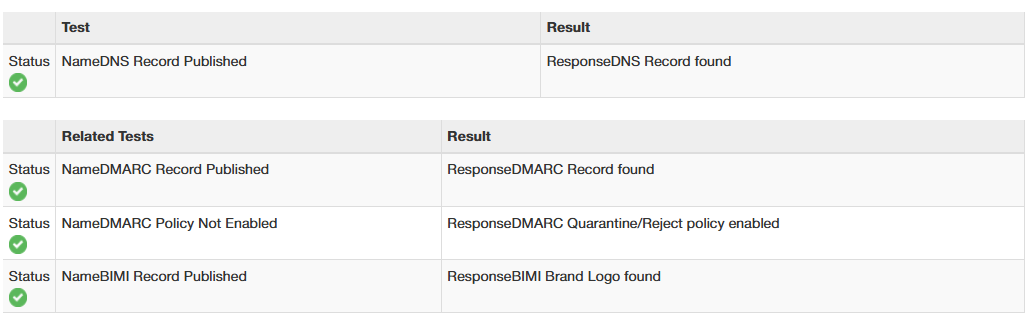
All three records should show a green status. If DMARC is set to p=none, change it to p=quarantine.

The result of a MxToolbox check after a successful setup — DMARC with a Quarantine/Reject policy and "BIMI Brand Logo found," both showing green statuses.
Step 2. Prepare your logo in SVG Tiny 1.2 format
BIMI only accepts logos in the SVG Tiny 1.2 format. A regular SVG won't work — you specifically need this version, with its particular constraints.
Logo requirements
- SVG Tiny 1.2 format
- Square aspect ratio (1:1)
- The logo must fill the entire canvas with no margins
- No external fonts, no JavaScript, no animation
- File size under 32 KB
A regular vector file from Figma or Illustrator likely won't work as-is — it needs to be adapted. You can check compliance with the BIMI Group Inspector: bimigroup.org/bimi-generator
Step 3. Get a VMC (Verified Mark Certificate)
A VMC is a certificate confirming you own the rights to your logo. Without one, BIMI technically only works in some clients and without the blue verification checkmark.
VMCs are issued by accredited certificate authorities: DigiCert and Entrust. To get one, you need a registered trademark in the country where your company operates. The annual cost is around $1,500.
If your logo isn't registered as a trademark, you can still set up BIMI without a VMC, but in Gmail the logo will show without the checkmark. Apple Mail will display it with verification even without a VMC.
Step 4. Host the logo on a server
The logo's SVG file needs to be accessible at a public HTTPS address. Upload the file to your server or a CDN. The address must start with https://, and the file must open without any authentication.
Example: https://brand.company.com/bimi/logo.svg
Step 5. Create a BIMI record in your DNS
A BIMI record is a TXT record in your domain's DNS. It tells mail clients where to find the logo and the certificate.
Record format:
Name: default._bimi.yourdomain.com
Type: TXT
Value: v=BIMI1; l=https://brand.company.com/bimi/logo.svg; a=https://brand.company.com/bimi/vmc.pem
The l parameter is the link to the logo. The a parameter is the link to the VMC certificate (if you have one). If you don't have a VMC, you can leave out the a parameter.
Step 6. Check the result
Wait 24–48 hours after adding the DNS record — that's how long propagation takes. Then check it via bimigroup.org/bimi-generator/ or send a test email to a Gmail address.
If everything is set up correctly, the logo will appear next to the sender's name in Gmail.
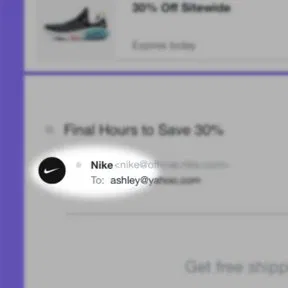
This is what BIMI looks like in Gmail — the brand logo appears next to the sender's name even before the email is opened
What affects deliverability
BIMI isn't just about visual identification. The authentication requirements it needs — a strict DMARC policy — improve deliverability on their own and lower the odds of landing in spam.
Companies with a verified logo in their emails see their open rate go up — the logo acts as a trust signal before the email is even opened.