
Technical failures, data leaks, or delayed orders demand an instant response. In moments like these, the team has no time to carefully choose words. Companies without ready-made templates react slowly, make communication mistakes, and lose loyalty. Prepared scenarios let you send an email on time and preserve customer trust.Below we break down the types of crisis emails that every company should have on file.
Rules for crafting crisis emails
In emergency situations, standard marketing techniques — bright banners, buttons, corporate stamps — undermine trust. The message should contain plain speech, facts, and a specific action plan.
Stick to three rules:
- Minimal design. Plain text feels like a personal message. That builds more trust.
- A personal signature. An email from a leader sounds more convincing than a message from a faceless "team".
- One task. Give the customer only one instruction: change their password, wait for the courier, or claim a promo code.
Scenarios for typical situations
1. Service outage
Inform users before they reach out to support. Describe the problem in plain language, give a recovery time, and provide contact details.
"Some users are experiencing issues with [feature]. We're already fixing the cause and will restore access by [time]. If your issue is urgent, contact us at [channel] — we'll respond within [timeframe]."
2. Security incident
This is a critical scenario. Be honest about which data was affected, and give instructions for securing the account.
"Attackers gained access to [list of data, e.g. email addresses]. Payment data and passwords are safe. To secure your account, please [specific action, e.g. change your password]. We've already strengthened our defenses and are working with security experts."
3. Delayed orders
Acknowledge the mistake without excuses. Name the new delivery date and offer compensation or the option to cancel.
"Your order #[number] is delayed and will arrive on [new date]. As an apology, we've added a promo code [code] to your next order. If the new date doesn't work for you, cancel the order via this link [link] — we'll refund you within [timeframe]."
4. Changes to terms or pricing
Give at least 30 days' notice of changes, briefly and honestly explaining the reason and stating the date the new terms take effect.
"Starting [date], the price of the [name] plan will change to [price]. We're updating our pricing to [brief reason, e.g. expand our infrastructure]. The new price will take effect for you starting [date of next billing]. You can change your plan or cancel your subscription in your account."
Case study: examples of real communication
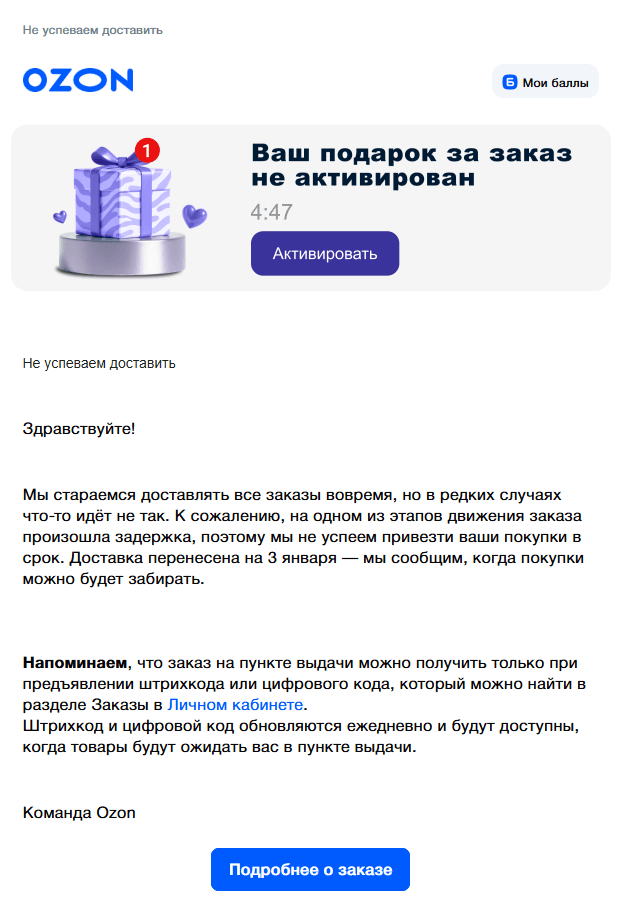
Ozon: a new delivery dateThe company immediately states the new delivery date — January 3. This gives the customer certainty and removes unnecessary questions. However, the bright promotional banner about a "gift" right at the start of the email may not land well. In a crisis email, advertising often distracts from the main message and can come across as out of place.

Megaplan: an honest apologyThe subject line "Sorry. Everything broke" instantly grabs attention. Instead of dry, formal phrases, the company uses lively language and even adds an ironic image of office chaos. This approach helps turn a problem into a trust-building conversation and quickly lowers customers' level of frustration.

VK Dobro: the "Most important" blockHere, the "Most important" block worked really well. The company highlighted the user's key fears in a separate box: there's no subscription, there won't be any charges. This lets a person get answers to all their worrying questions in a couple of seconds, without even reading the rest of the email — instantly relieving anxiety.

Kaiten: a list of limitationsThis is a good example of giving advance notice of maintenance work. Instead of just writing "the service will be unavailable", the company lists out the specific sections that will be affected (registration, payment, and others) point by point. This level of detail makes it much easier for users to plan ahead.

General rules for crisis emails
Rule | Why it works |
|---|---|
Response speed | Silence is often seen as an attempt to hide something. |
A personal signature | An email from a specific person builds more trust. |
The point stated in the first paragraph | Avoiding the topic only frustrates the reader. |
A single call to action | Under stress, it's hard for a person to process several requests at once. |
Minimal visuals | A crisis email shouldn't look like a promotional campaign. |
A contact for follow-up | A direct support address reduces negativity on social media. |
What to prepare in advance
Crisis templates can't be written in the heat of the moment, so they need to be prepared ahead of time. Here's the minimal set you should have on hand:
- Technical outage: the service or website is temporarily unavailable.
- Missed deadlines: logistics or production can't keep up with demand.
- Changed terms: updated pricing or service rules.
- An apology with a bonus: a tool for compensating a negative experience.
- Internal protocol: a protocol for fast communication within the team.
Each template is a ready-made structure with blank fields: what happened, when it will be fixed, and what the customer needs to do.
In Letteros, these materials are available to the whole team, but stay under your control. The role system lets you decide in advance who can edit templates and who can only fill in the data. This protects the text from accidental edits and layout mistakes at the most critical moment. All the marketer has to do is open the right template, fill in the details, and hit "send".
If you'd like to see how to set up these processes for your team specifically — we'll walk you through a product demo. Message Anna to arrange a convenient time.